
Is BlueDriver a Good Car Diagnostic Scanner? Honest Answer
Quick Answer
Yes, BlueDriver is a good car diagnostic scanner for most home mechanics who want clear fault-code help without a shop tool. It reads and clears engine codes, adds live data and Repair Reports, and covers more systems than a basic reader on supported cars. It falls short for active tests and full professional work.
- Reads engine, ABS, airbag, and transmission codes on supported cars.
- Gives vehicle-specific Repair Reports for each fault code.
- Shows live data, freeze frame, Mode 6, and smog readiness.
- Needs a phone and the BlueDriver app, with no subscription.
Your check engine light is on, and you want a plain answer before you buy a part. BlueDriver is one of the most talked about phone-based scanners for that job. This article explains what it does well, where it stops, and who should skip it.
In this article
- What Is BlueDriver?
- Is BlueDriver a Good Car Diagnostic Scanner?
- What Can BlueDriver Read and Clear?
- What Makes BlueDriver Different From a Code Reader?
- Where BlueDriver Works Well
- Where BlueDriver Falls Short
- BlueDriver Compared With a Cheap Reader and a Pro Tool
- Who Should Use BlueDriver, and Who Should Skip It?
- How to Check If BlueDriver Fits Your Car
- Mistakes to Avoid With BlueDriver
- Frequently Asked Questions
- Conclusion
What Is BlueDriver?
BlueDriver is a small Bluetooth sensor that plugs into the OBD2 port in a car. The sensor talks to a free app on iPhone or Android, and the phone shows codes, data, and repair help. The sensor has no screen of its own, so the phone is the display.
BlueDriver is made by Lemur Vehicle Monitors. Two hardware versions share the same app and core diagnostic functions. The tool works with cars, SUVs, and light trucks sold in North America with an OBD2 port. It covers most gas, diesel, and hybrid models from model year 1996 onward, as stated on the BlueDriver product page.
A basic code reader shows a code number and a short definition. BlueDriver adds context for that code, such as likely causes and fixes reported for the same car. That context is the main reason many home mechanics pick it over a bare reader. Bluetooth OBD2 scanners like this one trade a built-in screen for a larger phone screen and a richer app.
Is BlueDriver a Good Car Diagnostic Scanner?
BlueDriver is a good car diagnostic scanner for home use, when the job is reading codes and deciding the next repair step. It gives more system coverage and more repair context than a cheap reader. It is not a full shop tool, and it does not replace a scanner with active tests.
The short test is simple. If you need to read a check engine light, check live data, and narrow the likely cause, BlueDriver fits. If you need to command a part, run a relearn, or bleed brakes through the tool, BlueDriver does not fit. That split decides most buys.
Owner feedback and independent reviews point to the same split. The app and Repair Reports earn praise, while live data speed and phone dependence draw complaints. Coverage also varies by car, so two cars from the same brand can get different depth. Check your exact car before you judge the tool by a review of another car.
What does good mean here?
Good means the tool answers the code, points to a likely fix, and does not mislead the user. BlueDriver meets that test for common engine, emissions, and drivability faults. It fails the test when the repair needs the scanner to control a part.
Good also means the tool stays simple to use. BlueDriver plugs in, pairs over Bluetooth, and shows results in plain screens. A home mechanic can learn the flow in one scan. A pro who needs deep module work will hit its limits fast.
What Can BlueDriver Read and Clear?
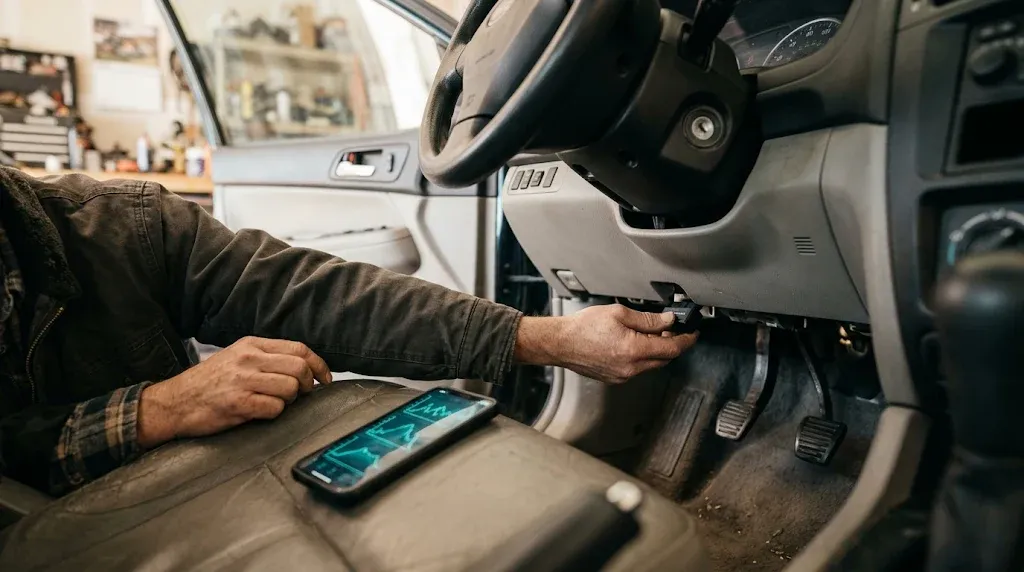
BlueDriver reads and clears check engine codes, plus enhanced codes on supported cars. Enhanced codes cover ABS, airbag, SRS, TPMS, and transmission systems, when the car supports them. The official product page lists those systems and notes that coverage varies by make, model, and year.
BlueDriver also shows freeze frame data, live sensor data, Mode 6 test results, and smog readiness. Freeze frame is a snapshot of engine conditions at the moment a code was set. Mode 6 gives advanced on-board test results, such as misfire counts. Smog readiness shows whether emissions monitors have run and passed.
Clearing a code turns off the warning light, but it does not fix the fault. If the fault is still present, the code and the light come back. Use clearing after a repair, or to test whether a fault repeats, not as a repair by itself. Read transmission codes with the same care, because a transmission code often needs a fluid check and a deeper test after the scan.
Which cars get enhanced coverage?
Enhanced coverage is listed for many popular makes, such as Ford, GM, Toyota, Honda, BMW, Chrysler, Nissan, Mazda, Subaru, Hyundai, and Kia. The exact systems vary by year and model, even inside one brand. A car from one model year can get full ABS and airbag coverage, while a different model year gets engine codes only.
Basic engine codes work on any car with an OBD2 port, even when enhanced coverage is absent. That split matters for older cars and for less common models. Do not assume that a brand name on the list means full coverage for your car.
What Makes BlueDriver Different From a Code Reader?
BlueDriver differs from a code reader in the help it adds after the code. A code reader names the fault, and BlueDriver adds a vehicle-specific Repair Report for that fault. The report lists possible causes and fixes reported for the same year, make, and model.
That report is the core feature of the tool. A code such as P0171 can mean a vacuum leak, a fuel delivery fault, or a sensor fault. A report tied to your car narrows the first checks, so you test the likely cause first. It does not prove the cause, and a visual check still matters before you buy a part.
BlueDriver also adds live data graphing, freeze frame, Mode 6, and smog readiness in one app. A cheap reader often stops at code reading and clearing. The phone screen helps here, because graphs and long code lists are easier to read on a phone than on a small handheld screen.
The app has no subscription and no in-app purchase for its core features, as stated on the official product page. You buy the sensor once, and the app unlocks the features with it. That point matters, because many phone-based tools charge a monthly fee for the useful parts.
Where BlueDriver Works Well
BlueDriver works well for check engine lights, intermittent faults, and emissions test prep. It reads the code, shows the conditions at the time of the fault, and gives a repair report for that car. That set covers most driveway diagnosis.
Live data helps when a fault appears only under load, after warm-up, or on the highway. You can watch coolant temperature, fuel trims, oxygen sensor readings, and engine speed as you drive. A trend in the data can point to a lean condition or a weak sensor, while a single code cannot.
Smog readiness helps before an emissions test. The app shows which monitors have passed and which are still incomplete. That view can save a wasted trip to the test station, when a monitor still needs a drive cycle to finish.
BlueDriver also works well as a first tool for a new home mechanic. The app explains codes in plain words, and the repair videos add steps for common jobs. A driver who has never used a scanner can get a useful answer in the first scan, without learning a pro tool menu.
Where BlueDriver Falls Short
BlueDriver falls short when a repair needs active control of a car part. It cannot command an actuator, run an ABS bleed, cycle a fuel pump, or program a TPMS sensor. Those jobs need a bidirectional scanner, which can send commands to the car.
Service functions in BlueDriver are instruction based, not active commands. The app can guide you through steps for an oil light or TPMS light reset. It does not send the reset command itself, as a pro tool does. An independent BlueDriver review notes this limit and warns buyers not to expect active service commands from the tool.
BlueDriver works only with its own app. It does not pair with third-party apps such as Torque, FORScan, or BimmerCode. If you already use one of those apps, or you need brand-specific coding, BlueDriver will not fit that workflow. An open adapter fits those apps, while BlueDriver stays inside its own system.
Live data refresh can feel slow next to a wired tool or a faster Bluetooth adapter. Owner reports cite lag in live data, and that lag matters for fast-changing signals such as oxygen sensor switching. The data still works for trends and for steady readings, but it is a weak point for split-second diagnosis.
Tip
Check your exact year, make, and model on the BlueDriver compatibility page before you order, because enhanced coverage changes by car.
Phone dependence is a real limit in a garage. A dead phone battery means no scan, while a wired handheld still works. Bluetooth pairing can also drop, and a dropped link in the middle of a scan wastes time. Keep the phone charged and close to the car during a scan.
BlueDriver Compared With a Cheap Reader and a Pro Tool
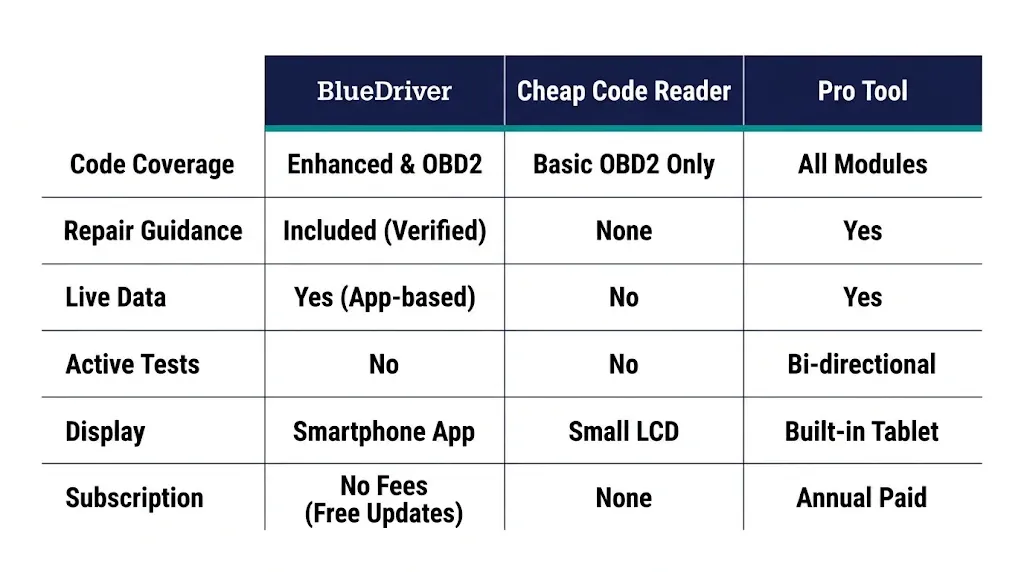
BlueDriver sits between a cheap code reader and a professional bidirectional tool. The cheap reader costs less and does less. The pro tool costs more and can control parts. BlueDriver gives more context than the cheap reader, without the control of the pro tool.
Cheap OBD2 scanners suit a driver who only wants to read and clear a code now and then. BlueDriver suits a driver who wants to know why the code set and what to check first. A pro tool suits a driver who needs active tests and service functions every week.
The table below compares the three types on the points that decide a buy. Use it to match the tool to the job, not to the price alone.
| Feature | BlueDriver | Cheap code reader | Pro bidirectional tool |
|---|---|---|---|
| Code coverage | Engine plus ABS, airbag, and transmission on supported cars | Engine codes only, in most cases | Full system coverage on many cars |
| Repair guidance | Vehicle-specific Repair Reports | Code definition only | Repair data varies by tool |
| Live data | Yes, with graphing, freeze frame, and Mode 6 | Little or none | Yes, often faster and deeper |
| Active tests | No active control | No active control | Yes, commands parts and runs tests |
| Display | Phone app, iPhone and Android | Small built-in screen | Built-in screen or tablet |
| Subscription | No subscription for core features | No subscription, in most cases | Often needs paid updates |
The takeaway is clear. BlueDriver wins on repair context and phone display, the cheap reader wins on simplicity, and the pro tool wins on control. Pick the type that matches the next job, not the type with the longest feature list.
A BlueDriver scan tool review puts the same split in plain terms. BlueDriver is worth it for better fault-code context and live data than a cheap reader, but not for bidirectional control. That line matches the table above and the limits in the prior section.
Who Should Use BlueDriver, and Who Should Skip It?
BlueDriver suits a home mechanic who works on one or two family cars and wants clear code help. It suits a driver who checks a light before a shop visit, so the shop quote can be checked against a real code and a repair report. It also suits a buyer who wants one purchase with no monthly fee.
BlueDriver suits a used-car buyer who wants a quick scan before a deal. A scan can show stored codes, readiness status, and live data that a test drive alone cannot show. It does not replace a full pre-purchase inspection, but it adds facts to the decision.
BlueDriver does not suit a pro mechanic who needs active tests all day. It does not suit a driver who needs third-party app support, brand coding, or deep service functions. It also does not suit a driver whose car lacks enhanced coverage and who needs ABS or airbag codes as the main job. In that case, a different tool may read those systems, so check coverage first.
Value depends on use, not on the tool alone. If you scan a few times a month and use the reports to avoid a wrong part, the tool pays for itself in saved guesswork. If you scan once a year and only clear a code, a cheap reader may serve you just as well. That is the same value test as asking whether a scanner worth the cost fits your own repair habits.
If you
Want code help and repair context for home repairs
Choose BlueDriver, because Repair Reports narrow the first checks.
If you
Only read and clear a code now and then
Choose a cheap reader, because BlueDriver adds help you may not use.
If you
Need active tests, relearns, or service commands
Choose a bidirectional tool, because BlueDriver cannot command parts.
How to Check If BlueDriver Fits Your Car
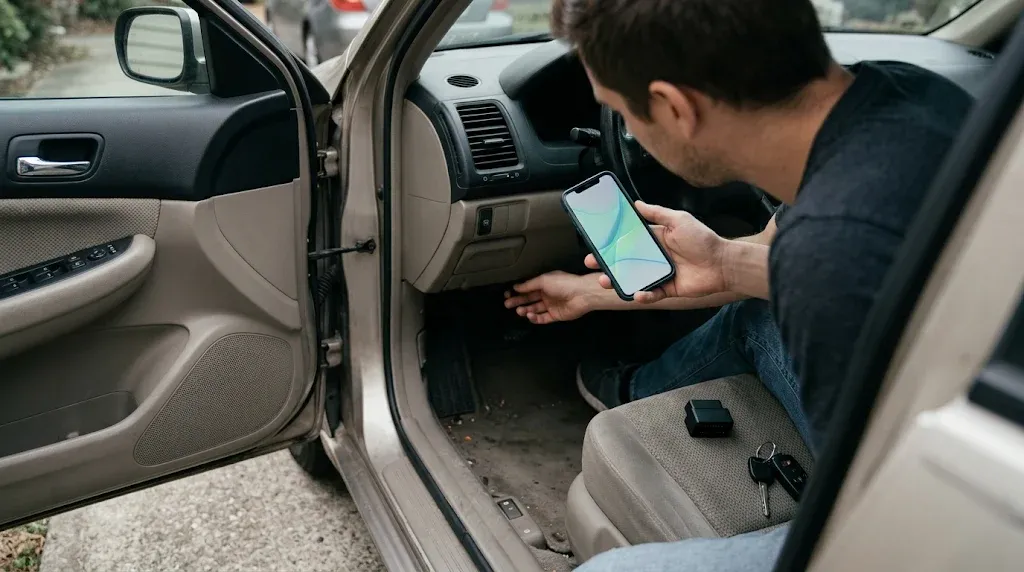
BlueDriver fits your car only when the port, the app, and the coverage all line up. Check those three points before you order. A five-minute check can save a return and a missed repair.
Step 1
Confirm the OBD2 port and model year
Find the OBD2 port under the dash on the driver side. Confirm the car is a 1996 or newer model sold in North America.
Step 2
Check enhanced coverage for your exact car
Use the BlueDriver compatibility checker for your year, make, and model. Note which systems it lists for that car.
Step 3
Install the app and test Bluetooth
Install the free BlueDriver app on your phone. Turn on Bluetooth and confirm the phone can pair with the sensor.
Step 4
Run a first scan with the key on
Plug the sensor in, turn the key on, and run a full scan. Read the codes, the freeze frame, and the Repair Report.
Step 5
Decide from the scan, not from the box
Keep the tool if the scan shows the systems you need. Return it if the scan lacks the ABS or transmission coverage you bought it for.
Do not skip Step 2 for a car with an ABS or airbag light. That light is the exact job where coverage matters most. A scan that shows engine codes only will not answer an ABS fault.
Mistakes to Avoid With BlueDriver
Do not buy a part from the code alone. A code names a system and a fault, not a failed part. Read the Repair Report, check freeze frame, and inspect the hose, wire, or connector first.
Do not leave the sensor plugged in for days without a need. The sensor draws power from the OBD2 port, and a car that sits can lose charge. Unplug it after a scan, unless you plan to log data on a drive.
Do not clear codes right before an emissions test. Clearing resets the readiness monitors, and the test station may reject the car until the monitors run again. Check readiness first, and clear codes only after a repair.
Do not expect BlueDriver to fix a car by itself. A scanner reads data and points to a cause. The repair still needs tools, parts, and a check after the work. If a fault involves fuel, brakes, or airbags, get help from a qualified mechanic when you are unsure.
Bluetooth OBD2 Scanner
A Bluetooth OBD2 scanner plugs into the diagnostic port and sends code, live data, and repair help to a phone app.
Frequently Asked Questions
Is BlueDriver good for beginners?
BlueDriver is good for beginners who want plain code explanations and repair help in one app. The sensor plugs in, the app pairs over Bluetooth, and the Repair Report lists likely causes for the code. A beginner still needs to check the car and the report before buying a part.
Does BlueDriver need a subscription?
BlueDriver needs no subscription for its core features, as stated on the official product page. The app is free, and the sensor purchase unlocks Repair Reports, live data, Mode 6, and smog readiness. No monthly fee is charged to use those features.
Can BlueDriver read ABS and airbag codes?
BlueDriver can read ABS and airbag codes on supported cars, when enhanced coverage includes those systems. Coverage varies by year, make, and model, even inside one brand. Check the compatibility page for your exact car before you rely on those systems.
Does BlueDriver work on iPhone and Android?
BlueDriver works on iPhone and Android through the free BlueDriver app. The sensor pairs over Bluetooth and shows codes and live data on the phone screen. The phone must stay charged and close to the car during a scan.
Can BlueDriver clear a check engine light?
BlueDriver can clear a check engine light after it reads and clears the stored code. Clearing does not fix the fault, so the light returns if the fault is still present. Use clearing after a repair, then drive the car and scan again to confirm the fix.
Does BlueDriver do bidirectional tests?
BlueDriver does not do bidirectional tests, because it cannot send active commands to car parts. It cannot command an actuator, run an ABS bleed, or program a sensor. A bidirectional scanner is needed for jobs that require the tool to control a part.
Is BlueDriver worth it over a cheap code reader?
BlueDriver is worth it over a cheap code reader when repair context, live data, and more system coverage help you avoid a wrong part. A cheap reader suits a driver who only reads and clears a code now and then. The choice depends on how often you scan and how much help you need after the code.
Conclusion
BlueDriver is a good car diagnostic scanner for most home mechanics, because it adds Repair Reports, live data, and more system coverage than a basic reader. If you need active tests or third-party app support, choose a different tool. If you scan at home and want clear next steps, check your car coverage and start with BlueDriver.

I’m Alex Rahman, a car enthusiast and automotive writer focused on practical solutions, car tools, and real-world driving advice. I share simple and honest content to help everyday drivers make better decisions.
