
Which OBD2 Scanner Fits Your Car? A Clear Buying Guide
Quick Answer
No single scanner fits every driver. The right choice depends on your car, the warning light, and the repair work you plan to do. A basic reader suits a check engine light. A phone adapter suits live data. An all-system or bidirectional tool suits brake, airbag, transmission, and service work.
- Match the scanner to the job, not to the longest feature list.
- Check coverage for your exact year, make, model, and engine.
- Generic engine access does not prove ABS, airbag, or transmission access.
- Ask about subscriptions and updates before you pay.
If you ask which OBD2 scanner is the best, the short answer is that the match matters more than the model. This guide compares scanner types by what they can read, what they can command, and who each type suits. After reading it, you can pick a type with confidence and check it against your car.
In this article
- What does ‘best’ mean for an OBD2 scanner?
- Which OBD2 scanner types exist?
- How do the main scanner types compare?
- What should you check before you buy?
- Which scanner fits a check engine light only?
- Which scanner fits ABS, airbag, and transmission work?
- Which scanner fits live data and home repairs?
- When is a bidirectional scanner worth it?
- What mistakes waste money?
- How do you use your first scan well?
What does ‘best’ mean for an OBD2 scanner?
The word best has no fixed meaning for an OBD2 scanner. A scanner earns that label only when it covers your car, your warning light, and your repair plan. A tool with more functions is not better if those functions never apply to your vehicle.
Start with the job in front of you. A driver who needs a code for a check engine light has a different job from a driver who needs an ABS bleed after brake work. The first job needs clear codes and readiness data. The second job needs module access and a command that the car accepts.
OBD2 is a standard system for on-board diagnostics. The EPA OBD guidance explains that the system monitors emission control parts and stores a trouble code when a fault is found. That standard covers engine and emissions work. It does not promise the same access to every other module in the car.
Which OBD2 scanner types exist?
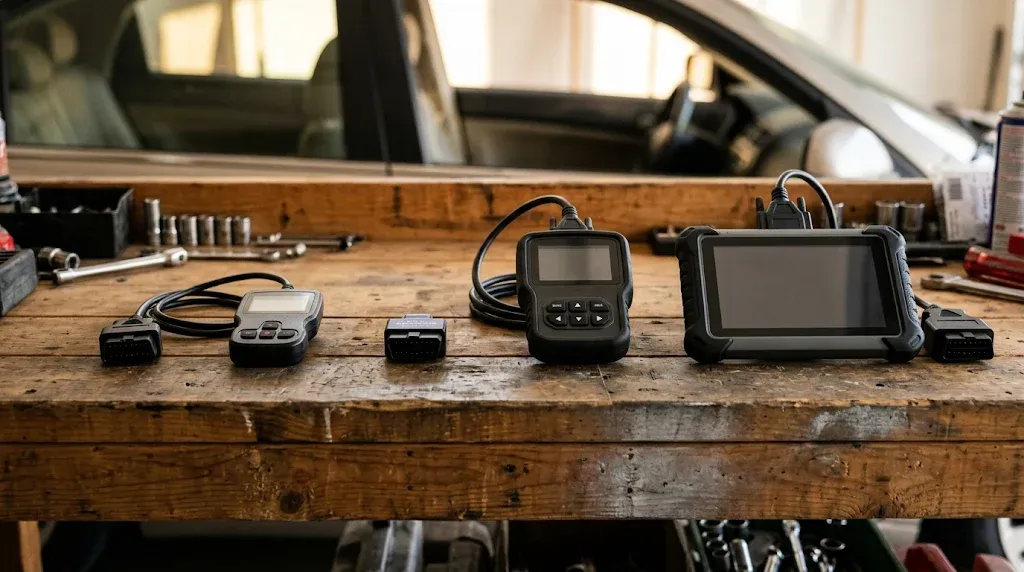
Four scanner types cover most home and shop needs. The types differ by screen, connection, module access, and control. The right type follows the work you do most often.
What is a basic code reader?
A basic code reader is a small handheld tool with a cable and a simple screen. The reader plugs into the 16-pin port under the dash and reads engine codes. It can clear eligible codes and show readiness monitors.
A basic reader suits a driver who wants a plain answer to a check engine light. It does not show deep live data graphs in most cases. It does not reach ABS, airbag, or transmission modules in most cases.
What is a Bluetooth or Wi-Fi adapter?
A Bluetooth or Wi-Fi adapter is a small plug that sends car data to a phone app. The phone becomes the screen, the graph tool, and the code library. The adapter plus the app decides the real capability.
An adapter suits a driver who likes phone screens and live data. The app may hide graphing or enhanced codes behind a paid plan. A weak app can limit a good adapter, so pick the app first and check the adapter it supports.
What is an all-system handheld scanner?
An all-system handheld scanner is a self-contained tool with its own screen and cable. The scanner can read codes from more than the engine computer on supported vehicles. It can cover engine, transmission, ABS, airbag, and body modules where the maker lists that coverage.
A handheld suits a driver who wants one tool without a phone. It starts fast and works without pairing. It can cost more than a basic reader, and its coverage still varies by vehicle.
What is a bidirectional tablet scanner?
A bidirectional tablet scanner is a larger tool that can send commands to the car. The tool can run active tests, cycle a part, or run a service reset where the vehicle supports it. It can also read many modules and show live data in graphs.
A tablet suits a serious home mechanic or a small shop. It suits brake work, relearns, and post-repair checks. It is easy to overbuy if you never use active tests.
Basic code reader
Best for: A check engine light
- Reads: Engine codes
- Screen: Built-in, simple
- Control: Read and clear only
Bluetooth adapter
Best for: Live data on a phone
- Reads: Engine, plus app limits
- Screen: Phone app
- Control: Read and clear in most cases
All-system handheld
Best for: More than engine codes
- Reads: More modules, where listed
- Screen: Built-in, larger
- Control: Some service resets
Once you pick a type, learn how to use an OBD2 scanner before your first fault appears. A calm first scan gives clearer notes than a rushed scan at a warning light.
How do the main scanner types compare?
The table below compares the four main types on the same points. Use it to see the trade-off between price, access, and control.
| Scanner type | What it reads | What it can do |
|---|---|---|
| Basic code reader | Engine codes | Read, clear, readiness |
| Bluetooth adapter | Engine, plus app support | Read, clear, live data |
| All-system handheld | More modules, where listed | Read, clear, live data, some resets |
| Bidirectional tablet | Many modules, where listed | Read, clear, live data, active tests, resets |
The table shows a clear pattern. More access and more control sit in the larger tools. The eBay Motors guide lists about $30 for a basic code reader, $100 to $200 for an enhanced scanner with live data, and $300 to $500 for a bidirectional tool. Those ranges are guides, not fixed prices for every tool.
Price tracks capability in most cases. A tool that costs far less than its claimed functions should raise a question. Check the maker coverage list and the update terms before you trust a low price.
What should you check before you buy?
Compatibility is the buying decision, not the box claim. A scanner can connect to the engine computer and still miss the module you need. Check the vehicle, the protocol, the modules, and the functions in that order.
How do you check vehicle coverage?
Vehicle coverage means the exact year, make, model, engine, and market for your car. A claim that a tool works with one brand is not enough. A claim that it works with one model is not enough if your trim or engine differs.
Use the maker coverage checker with your vehicle details. Search for the exact system and the exact function, not only the brand name. If the checker does not list your car, treat the claim as unproven.
How do you check protocol and module access?
Protocol is the language the scanner uses to talk to the car. Most modern cars use CAN for OBD communication. Older cars may use other protocols, so a tool that lacks the right protocol can fail to connect.
Module access is a separate check. Generic OBD access covers engine and emissions data in most cases. ABS, airbag, transmission, and body modules need enhanced coverage for your make and model. The VFixCars scanner guide explains that port presence does not prove access to those modules.
Tip
Write down your vehicle identification number and the warning light before you search a coverage list.
Some cars use a secure gateway that blocks write commands without approved access. A scanner may read codes on such a car and still fail to clear a code or run a test. Check gateway support in the coverage notes for your exact vehicle.
What should you ask about subscriptions and updates?
Subscriptions change the true cost of a scanner. Some tools include updates for a set period and then charge for more. Some apps lock live data, graphing, or enhanced codes behind a paid plan.
Ask three questions before you buy. Does the price include updates, and for how long? Does live data need a paid plan? Does the tool need a paid plan for the module you need? A clear answer protects you from a surprise fee after the first scan.
Manufacturer-specific codes add another layer. A P1 code can mean one thing on one brand and a different thing on another brand. Our guide to manufacturer-specific codes explains why the code number alone does not settle the diagnosis.
Which scanner fits a check engine light only?
A basic code reader fits a check engine light only. The reader shows the code, the status, and the readiness monitors. That is enough to start a search for the cause or to give a shop a clear code.
Choose a reader that shows stored, pending, and permanent codes where supported. Pending codes can show a fault that has not yet met the conditions for a confirmed code. Freeze frame can show the conditions when the fault was stored.
Do not buy a bidirectional tablet for this job alone. The extra cost buys active tests you will not use. A simple reader plus a careful note of the code is the better use of money for this job.
Which scanner fits ABS, airbag, and transmission work?
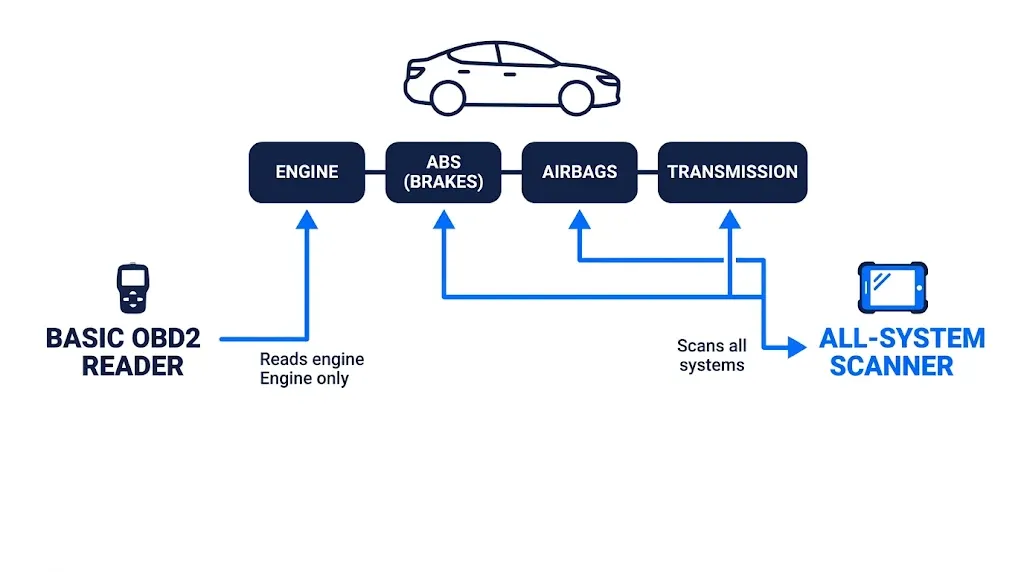
An all-system scanner fits ABS, airbag, and transmission work. The scanner must list each module by name for your exact vehicle. A general claim of four-system access is not enough on its own.
ABS codes live in the brake controller, not in the engine computer. Airbag codes live in the restraint controller. Transmission codes live in the transmission controller. A basic engine reader can show no codes while one of those lights stays on.
Check live data for the system in question. Wheel speed data can show a sensor that drops out. Transmission data can show a shift fault that a code alone does not explain. Our page on ABS and SRS coverage goes deeper on brake and airbag access for supported vehicles.
Service work after a repair may need more than a code read. An ABS bleed, a steering angle reset, or an airbag code clear can need a listed function for your vehicle. Confirm that function in the coverage list before you start the repair.
Which scanner fits live data and home repairs?
A Bluetooth adapter or an all-system handheld fits live data and home repairs. The adapter wins on screen size and graphing. The handheld wins on speed, a wired link, and no phone pairing.
Live data turns a code into a test. A misfire code points to a cylinder. Fuel trim data can point to a vacuum leak, a weak injector, or a worn spark plug. Coolant temperature data can show a warm-up fault. A single value rarely proves a part has failed, so compare values with the maker service data for your car.
Choose the adapter route if you like phone graphs and data logs. Choose the handheld route if you want a tool that works without a phone. The OBD2 app guide can help you compare app options for a phone-based setup.
If you
Want a code for a check engine light
Choose a basic code reader, because it covers the job with the least cost and fuss.
If you
Want live data and graphs on your phone
Choose a Bluetooth adapter, because the app gives a large screen and clear graphs.
If you
Need ABS, airbag, or transmission codes
Choose an all-system scanner, because an engine reader can miss those modules.
If you
Do brake work and relearns at home
Choose a bidirectional tool, because it can command the tests and resets.
When is a bidirectional scanner worth it?
A bidirectional scanner is worth it when active tests are part of your repair work. The tool can command a fan, cycle a solenoid, retract a parking brake piston, or run an ABS bleed where the vehicle supports it. Those commands help you test a repair instead of guessing.
It is not worth it for code reading alone. A driver who scans a few times a year will not use the active tests enough to justify the cost. A shop or a serious home mechanic who does brake jobs, injector tests, and relearns will use them often.
Check the exact active test for your exact vehicle. Bidirectional coverage varies by make, model, and function. A tool may list a test in general terms and still lack it for your car.
What mistakes waste money?
The most common mistake is buying on a brand claim alone. A scanner that works well on one brand can lack coverage on another brand. A scanner that reads engine codes well can miss the module behind your warning light.
Another mistake is paying for functions you will not use. A tablet with coding and programming can look like good value. It is poor value if you never code a module or program a key.
A third mistake is clearing a code before you record it. Clearing erases the code, the freeze frame, and the readiness state. That loss makes the next scan harder and can hide a fault before an emissions test.
Warning
A flashing check engine light can mean a misfire that harms the engine. Stop driving and seek help if the light flashes.
Treat brake and airbag warnings with care even if an engine scan shows no codes. Those systems use separate controllers. A basic reader may not reach them, so a clear engine scan does not clear those warnings.
How do you use your first scan well?
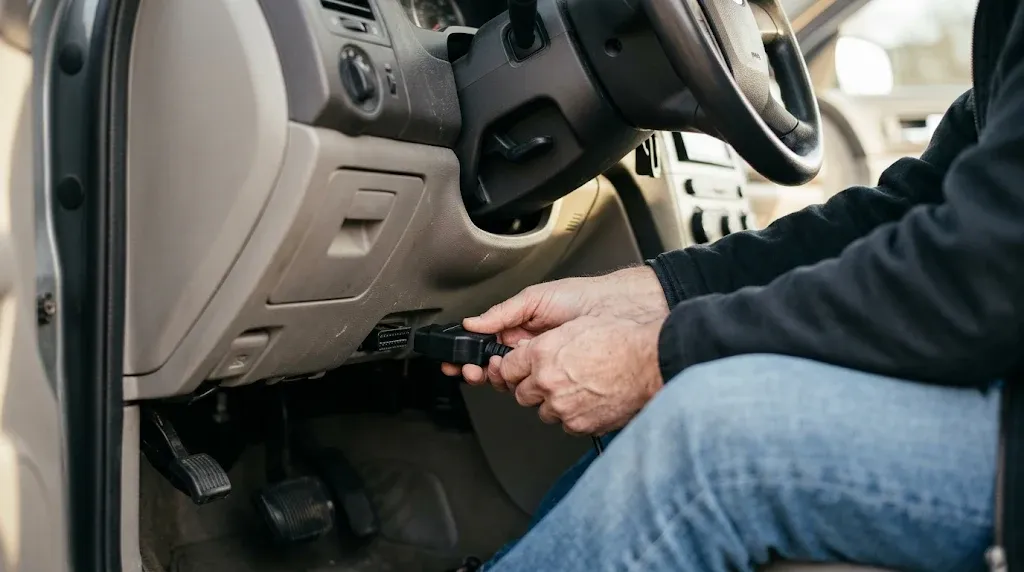
A good first scan follows a short, calm routine. The routine protects your notes and gives you a clear result to act on. Use it on a parked car in a safe place.
Step 1
Park and find the port
Park on level ground and set the parking brake. Find the 16-pin port under the dash, near the steering column.
Step 2
Plug in and switch on
Plug the scanner in without force. Switch the ignition on without starting the engine, unless the tool says otherwise.
Step 3
Read and record codes
Select the read codes menu. Write down each code, its status, and the module that reported it.
Step 4
Save live data and freeze frame
Save freeze frame and readiness data before you clear a code. Note live data values that look out of range.
Step 5
Diagnose, repair, then scan again
Use the code as a starting point for tests. Complete the repair, then scan again to check the result.
A code is a clue, not a part order. The same code can come from several causes. A test that checks the cause saves more money than a fast part swap.
OBD2 Scanner
An OBD2 scanner helps you read codes, check live data, and confirm a fault before you book a repair.
Frequently Asked Questions
Can one scanner work on every car?
One scanner cannot work on every car in full depth, because coverage depends on the exact vehicle and the systems you need to reach. Generic engine access is common, while ABS, airbag, and transmission access varies by make and model. Check the maker coverage list for your exact vehicle before you buy.
Do I need a scanner for a single warning light?
A scanner helps with a single warning light by giving you the exact code and the module that set it. A basic reader is enough for a check engine light in most cases. A brake or airbag light may need an all-system tool that can reach that module.
Is a phone adapter enough for home diagnosis?
A phone adapter is enough for home diagnosis when the app covers your car and shows the live data you need. The adapter plus the app decides the result, so a weak app can limit a good adapter. Pick the app first, then buy an adapter it lists as supported.
Why does my scanner show no code with a warning light on?
A scanner can show no code with a warning light on when the fault lives in a module the tool cannot reach. An engine reader may miss ABS, airbag, or transmission faults on the same car. Check which module matches the light and confirm that the scanner lists it.
Should I clear a code before a repair?
Clearing a code before a repair is a poor step, because it erases the code, freeze frame, and readiness data you need for tests. Record the code and its status first, then diagnose the cause. Clear the code only after the repair, then scan again to check the result.
What does bidirectional mean in plain words?
Bidirectional means the scanner can send a command to the car, not only read data from it. The command can cycle a part, run a test, or reset a service function where the vehicle supports it. That control helps you test a repair, but it is not needed for simple code reading.
Does a scanner tell me which part to replace?
A scanner does not tell you which part to replace, because a code points to a system and a fault condition, not to a proven part failure. The same code can come from a sensor, wiring, a leak, or a mechanical fault. Use live data and service tests to find the cause before you buy a part.
Conclusion
Which OBD2 scanner is the best depends on your car, your warning light, and the work you will do with it. Pick the simplest type that covers those jobs, check it against your exact vehicle, and save the rest of your budget for the repair itself.

I’m Alex Rahman, a car enthusiast and automotive writer focused on practical solutions, car tools, and real-world driving advice. I share simple and honest content to help everyday drivers make better decisions.
