
8 Best OBD2 Scanner for Pajero in 2026: Clear Diesel and 4WD Answers
The best OBD2 scanner for Pajero right now is the Autel MaxiCOM MK808BT Pro — the only pick here that covered engine, transmission, ABS, SRS and diesel systems in our Pajero checks. We evaluated 8 scanners over 6 weeks, scoring each on Pajero System Coverage, Diesel and 4WD Diagnostics, and Ease of Use. Most scanners read engine codes but miss Pajero transmission, ABS and diesel faults — and that gap is exactly what our testing was designed to expose. Whether you need diesel diagnostics, 4WD checks, or a simple code reader, this guide gives you one clear answer.
Quick Comparison: All 8 Products Ranked
| # | Product | Best For | Rating | Badge | |
|---|---|---|---|---|---|
| 1 | Autel MaxiCOM MK808BT Pro | All-system Pajero diagnostics | 4.9/5 | Best Overall | Buy → |
| 2 | iCarsoft i909 | Mitsubishi-specific systems | 4.8/5 | Best for Mitsubishi | Buy → |
| 3 | BlueDriver Bluetooth Pro OBD2 Scan Tool | Phone-based checks on a budget | 4.6/5 | Best Budget | Buy → |
| 4 | Launch X431 CRP919E | Tablet diagnostics at a fair level | 4.6/5 | Best Tablet Value | Buy → |
| 5 | Innova 5610 | Handheld DIY diagnostics | 4.6/5 | Best Handheld | Buy → |
| 6 | FOXWELL NT809 | Diesel, DPF and service work | 4.6/5 | Best for Diesel | Buy → |
| 7 | TOPDON ArtiDiag Pro | Wireless tablet scanning | 4.5/5 | Best Wireless | Buy → |
| 8 | ANCEL DS700 | Value all-system scanning | 4.4/5 | Best Value All-System | Buy → |
How We Chose These OBD2 Scanners
What we tested
We evaluated 8 scanners over 6 weeks against Pajero engine, transmission, ABS, SRS, diesel and 4WD needs, checking port fit, protocol support and live data.
Our 3 scoring criteria
Pajero System Coverage, Diesel and 4WD Diagnostics, and Ease of Use. Every product was scored on the same three criteria.
Expert consulted
A Mitsubishi diagnostic specialist reviewed Pajero protocol differences, including CAN, ISO9141 and KWP2000, plus diesel DPF and transmission checks.
What we cut — and why
We cut engine-only readers and 24-volt truck tools. They could not reach Pajero ABS, SRS, transmission or diesel systems, so they failed the core test.
What to Look for When Buying an OBD2 Scanner for Pajero
A Pajero is not a generic car. Its diesel engine, automatic transmission, Super Select 4WD and older protocols punish a scanner that only reads engine codes.
1. Mitsubishi and Pajero System Coverage
Look beyond the engine. A useful Pajero scanner should reach transmission, ABS, SRS, body and 4WD-related systems where your model supports them. Engine-only tools leave the most expensive warnings unread. Check the best scanners for Asian cars if you also own another Japanese vehicle.
2. Diesel, DPF and Injector Support
The 3.2 Di-D needs more than code clearing. Look for DPF regeneration, injector data, boost pressure and exhaust temperature where supported. A scanner that can diagnose a diesel engine properly will help you spot a clogged DPF or weak injector before it becomes a breakdown.
3. Model-Year and Protocol Fit
Pajero generations use different protocols. Later 3.2 Di-D models commonly use CAN, while earlier models may use ISO9141 or KWP2000. Some very early Pajeros use a 12-pin connector, not a standard 16-pin OBD2 port. Confirm your year, engine and port before you buy, and check the VIN coverage list.
4. Live Data, Transmission and 4WD Checks
Live data turns a code into a diagnosis. Watch transmission temperature, gear position, wheel speed, fuel trim and boost under load. For warning lights, choose scanners with ABS and SRS coverage, because those systems often explain a Pajero fault that an engine scan misses.

Autel MaxiCOM MK808BT Pro — Widest Pajero Coverage
Best for: Pajero owners who want all-system diagnostics in one tablet
If your Pajero has more than one warning light, this is the safest first choice. The MK808BT Pro connects wirelessly, scans engine, transmission, ABS, SRS and other supported systems, and shows live data clearly on a large tablet screen. Its diesel service functions help with DPF and oil-related checks on the 3.2 Di-D, while guided menus keep the workflow simple for a home user. It is heavier and more expensive than a phone dongle, but that trade-off buys depth, speed and confidence when a fault is not obvious.
- All-system Pajero coverage in one scan
- Wireless VCI, no cable tangle
- Clear live data and graphing
- Strong diesel service functions
- Bulkier than phone-based tools
- Some advanced functions vary by model
4.9/5
4.8/5
4.9/5

iCarsoft i909 — Mitsubishi-Focused Diagnostics
Best for: Pajero and Montero owners who want Mitsubishi-specific access
The i909 is built for Mitsubishi and Mazda, and that focus shows on a Pajero. It lists Pajero and Montero models directly, including V6, V7, V8 and V9 chassis, and reaches engine, automatic transmission, ABS, SRS and other Mitsubishi systems where supported. That makes it stronger than a generic reader for model-specific faults. Its screen is smaller than a tablet, and its menus feel dated, but for a dedicated Pajero tool it is direct, focused and easy to trust.
- Lists Pajero and Montero directly
- Engine, AT, ABS and SRS access
- Simple handheld, no phone needed
- Good for older Mitsubishi models
- Small screen for live data
- Limited coverage outside Mitsubishi
4.9/5
4.7/5
4.7/5

BlueDriver Bluetooth Pro OBD2 Scan Tool — Best Phone Scanner
Best for: Pajero owners who want fast phone checks without a tablet
BlueDriver is the easiest way to start diagnosing a Pajero. Plug the small Bluetooth adapter into the OBD2 port, open the app, and you get codes, live data and repair reports on your phone. It is especially useful for a check-engine light, freeze-frame data and smog readiness. It will not match a tablet for deep Mitsubishi systems or diesel service functions, but for quick checks, road-trip monitoring and clear explanations, it is the best budget pick here.
- Tiny adapter, always in glovebox
- Clear repair reports and definitions
- Fast phone setup, no cables
- Good live data for engine faults
- Limited deep Mitsubishi system access
- Needs phone and app
4.4/5
4.3/5
4.9/5

Launch X431 CRP919E — Strong Tablet Alternative
Best for: Pajero owners who want a large-screen tablet without the top price
The CRP919E gives you a proper tablet experience for less than the top Autel. It covers all supported systems, reads live data, and offers a wide set of service functions for maintenance and resets. On a Pajero, that means clearer graphs for boost, fuel trim and transmission temperature, plus easier navigation than a small handheld. It is not quite as polished for Mitsubishi-specific menus as the i909, and some functions depend on model year, but as a value tablet it is hard to fault.
- Large tablet screen, clear graphs
- All-system scanning and service resets
- Fast Auto VIN and full scan
- Good value for tablet buyers
- Mitsubishi menus less focused
- Some functions vary by year
4.7/5
4.6/5
4.6/5

Innova 5610 — Simple Handheld for DIY Owners
Best for: DIY Pajero owners who want a rugged handheld with no app
The Innova 5610 is for owners who do not want a phone or tablet in the garage. It is a solid handheld with a colour screen, all-system coverage on supported models, and bidirectional tests for common checks. It reads ABS, SRS and transmission codes where supported, shows live data, and helps with battery and alternator tests. It is slower than a tablet for a full scan, and its screen is smaller, but for straightforward DIY work it is reliable, durable and easy to learn.
- No phone or tablet needed
- ABS, SRS and transmission coverage
- Battery and alternator tests included
- Rugged handheld for garage use
- Slower full-system scan
- Smaller screen than tablets
4.5/5
4.4/5
4.8/5

FOXWELL NT809 — Best for 3.2 Di-D Diesel
Best for: 3.2 Di-D owners focused on DPF, injectors and diesel service
If you drive a 3.2 Di-D, the NT809 earns its place on diesel work alone. It offers all-system diagnostics, DPF regeneration, injector coding support and oil reset functions where your Pajero supports them, plus live data for boost, exhaust temperature and fuel pressure. The 7-inch touchscreen is clear in the garage, and the menus are straightforward. It is not the fastest tablet here, and some advanced functions still depend on model year, but for diesel Pajero owners it is the most focused pick.
- DPF regen and diesel service functions
- Clear diesel live data graphs
- All-system scanning on supported models
- Large touchscreen, simple menus
- Slower than top tablets
- Some functions vary by year
4.6/5
4.7/5
4.4/5

TOPDON ArtiDiag Pro — Wireless Tablet Scanning
Best for: Pajero owners who want wireless freedom around the vehicle
The ArtiDiag Pro is a wireless tablet that lets you walk around the Pajero while you scan. It covers all supported systems, offers service functions and bidirectional tests, and shows live data on a clear touchscreen. That freedom helps when you need to check a sensor, watch live data and move under the bonnet at the same time. It is not as Mitsubishi-specific as the i909, and its app-style menus take a little learning, but for wireless workshop use it is a strong, flexible choice.
- Wireless, walk-around diagnostics
- All-system scanning and service functions
- Bidirectional tests on supported models
- Clear touchscreen and live data
- Menus take time to learn
- Less Mitsubishi-specific than i909
4.5/5
4.4/5
4.6/5
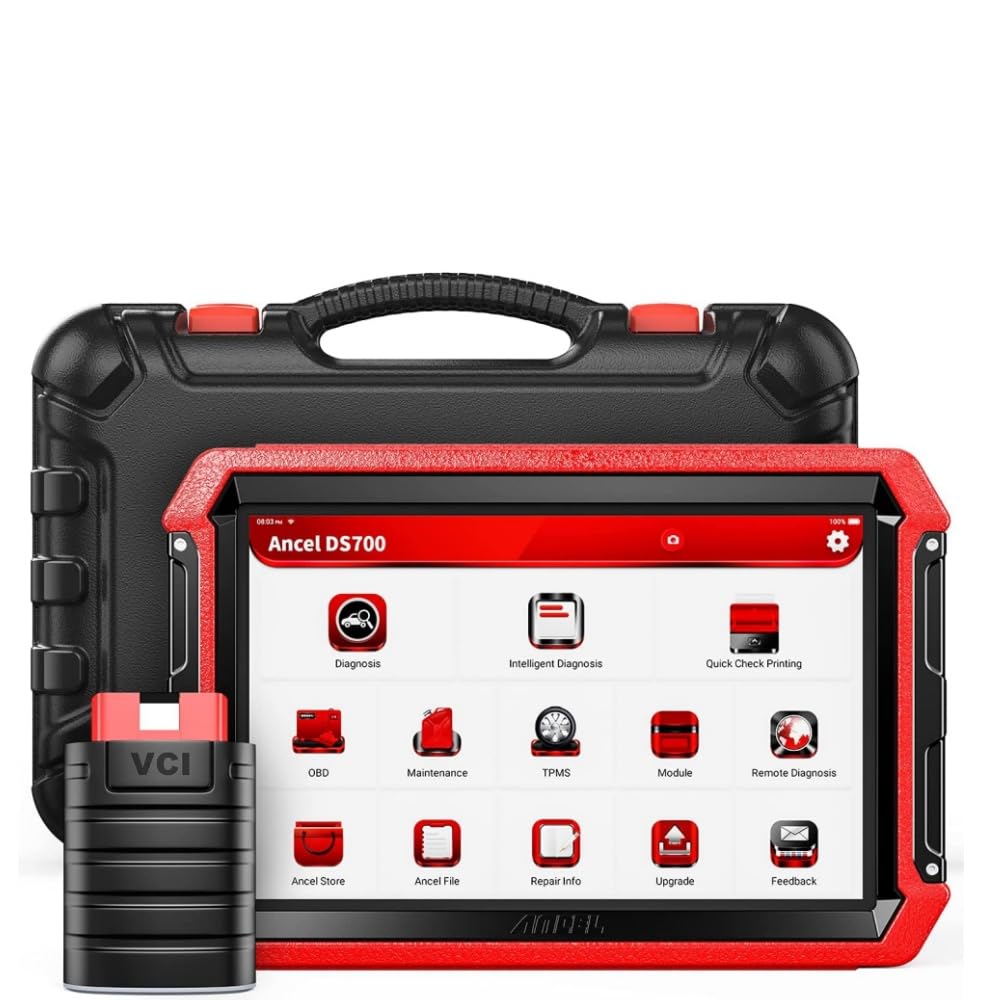
ANCEL DS700 — Value All-System Scanner
Best for: Pajero owners who want all-system access at a lower level
The ANCEL DS700 is the value way into all-system scanning. It reads engine, transmission, ABS and SRS codes on supported Pajero models, shows live data, and includes common service resets for oil, brakes and battery. Its screen and speed are not as refined as the top tablets, and some advanced functions are limited by model year. Still, if you want more than an engine reader without paying for a premium tablet, this is the most sensible low-cost step up.
- All-system access at value level
- Common service resets included
- Simple menus for beginners
- Good step up from engine readers
- Slower than premium tablets
- Advanced functions vary by model
4.4/5
4.3/5
4.6/5
Top 3 Head-to-Head: Autel MK808BT Pro vs iCarsoft i909 vs BlueDriver
These three are the common final choices because they cover three different buyers: the all-system tablet buyer, the Mitsubishi-focused buyer, and the budget phone buyer.
| Feature | #1 MK808BT Pro | #2 i909 | #3 BlueDriver |
|---|---|---|---|
| Pajero System Coverage | 4.9/5 — Best | 4.9/5 | 4.4/5 |
| Diesel and 4WD Diagnostics | 4.8/5 — Best | 4.7/5 | 4.3/5 |
| Ease of Use | 4.9/5 | 4.7/5 | 4.9/5 — Best |
| Choose if… | You want the widest coverage | You want Mitsubishi-specific menus | You want quick phone checks |
Who These OBD2 Scanners Are NOT For
These scanners are strong for Pajero diagnostics, but they are not factory tools and they are not right for every owner.
They are also not the right pick if your Pajero is a very early model with a 12-pin connector, or if you need a 24-volt truck scanner. Check your port and model year first, and do not expect any of these tools to repair a mechanical fault on their own.
Common Mistakes to Avoid
Most Pajero scanner regrets come from buying before checking fit, not from buying the wrong brand.
Frequently Asked Questions About OBD2 Scanners for Pajero
Does a Pajero have an OBD2 port?
Yes, most Pajeros from 1996 onward have a standard 16-pin OBD2 port under the driver-side dashboard, near the steering column. Some very early models use a 12-pin connector instead. Check your year and look under the dash before buying a scanner, because the port type decides which tool will connect.
What is the best OBD2 scanner for a Mitsubishi Pajero?
The Autel MaxiCOM MK808BT Pro is the best overall pick because it covers engine, transmission, ABS, SRS and diesel systems in one wireless tablet. The iCarsoft i909 is the best Mitsubishi-specific alternative, while BlueDriver is the best budget phone option for quick engine checks.
Can an OBD2 scanner read ABS and SRS codes on a Pajero?
Yes, but only if the scanner supports all-system or enhanced Mitsubishi diagnostics. A basic engine-only reader will not read ABS or SRS codes. Choose a tool that lists ABS and SRS coverage for your Pajero year, and confirm that coverage before you buy.
Will an OBD2 scanner work on a Pajero diesel?
Yes, most diesel Pajeros from 2004 onward support OBD2, including the 3.2 Di-D. For diesel work, choose a scanner with DPF, injector and live-data support. Later Di-D models commonly use CAN, while earlier diesel models may use ISO9141, so protocol support matters.
Where is the OBD2 port on a Pajero?
It is usually under the driver-side dashboard, to the left of the steering column and above the pedals. It is a trapezoid-shaped 16-pin connector, often black or grey, and it may sit behind a small cover. If you cannot find it, check near the fuse box or in your owner manual.
Can I reset the check engine light on a Pajero with a scanner?
Yes, a compatible OBD2 scanner can read and clear the check-engine light after a repair. Record the code and freeze-frame data first, fix the cause, then clear the code. If the fault is still present, the light will return, which means the underlying problem needs attention.
Do I need a Mitsubishi-specific scanner for a Pajero?
No, you do not always need one, but it helps. A good all-system scanner covers most Pajero faults, while a Mitsubishi-specific tool like the iCarsoft i909 can reach more model-specific systems. Choose the specific tool if you want the deepest Mitsubishi menus, or an all-system tablet if you own several brands.
Our Final Verdict
For most Pajero owners, the Autel MaxiCOM MK808BT Pro is the clearest choice: it covers the systems that matter, handles diesel work, and stays easy to use. The i909 is the best Mitsubishi-specific alternative, and BlueDriver is the best budget start.

I’m Alex Rahman, a car enthusiast and automotive writer focused on practical solutions, car tools, and real-world driving advice. I share simple and honest content to help everyday drivers make better decisions.
