Can You Use Your Phone as a Dash Cam and Is It Worth It?
Quick Answer
Yes, you can use your phone as a dash cam. Install a dash cam app, mount your phone on the windshield, and keep it powered. This setup records your drive like a real dash cam, but it may struggle with heat, storage, and long-term reliability.
I once forgot to bring my dash cam on a long trip. I grabbed my phone and improvised. It worked, but not perfectly.
I’m Alex Rahman, and I help drivers find smart, simple tech solutions. Many people ask if a smartphone can replace a dash cam.
You already own a powerful camera in your pocket. That sounds like an easy win. But is it really that simple?
Let’s break it down step by step.
Key Takeaways
- Your phone can act as a dash cam with the right setup.
- You need a mount, charger, and recording app.
- Heat and battery drain are the biggest risks.
- A real dash cam is still better for daily use.
Can You Use Your Phone as a Dash Cam and How Does It Work?
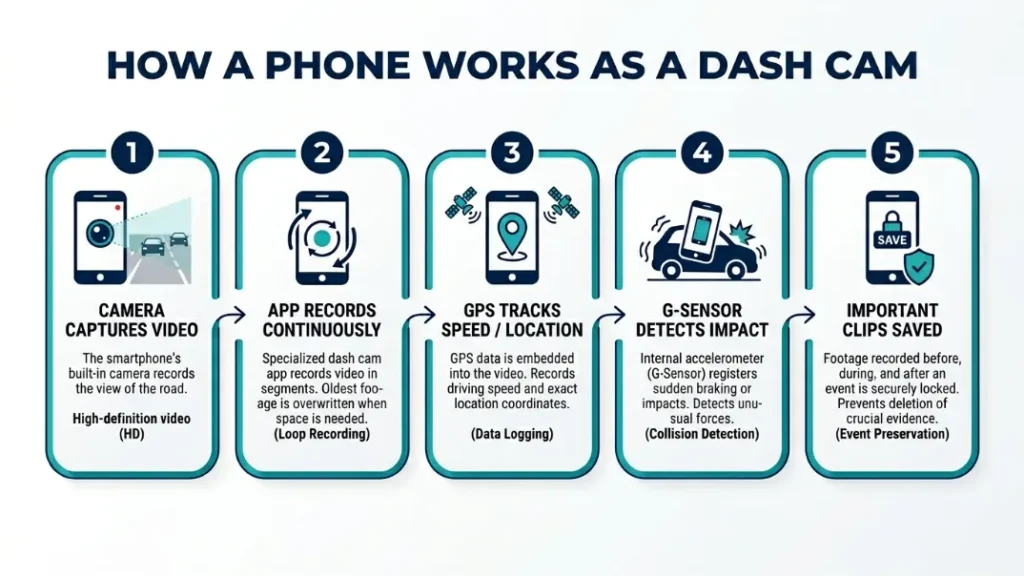
Yes, your phone can work as a dash cam by using its camera, storage, and sensors to record continuous driving footage with a dedicated app that manages loop recording and saves important clips automatically.
Your smartphone already includes a camera, GPS, and motion sensors. These features mimic what a dash cam does.
Dash cam apps turn your phone into a recording system. They capture video, track speed, and save clips during sudden stops.
The key rule: your phone must stay stable, powered, and recording at all times.
When you set it up right, it works well for short trips. But long drives reveal its limits.
What Do You Need to Turn Your Phone Into a Dash Cam?
You need a stable mount, a constant power source, and a reliable dash cam app to turn your phone into a working dash cam that can record continuously without interruption or overheating issues.
Without these basics, your setup fails quickly. A loose phone or dead battery ruins everything.
Essential Accessories for a Stable Setup
- Windshield mount: Keeps your phone steady and angled correctly
- Car charger: Powers your phone during long drives
- High-quality cable: Prevents disconnects while driving
Rule: stability equals clear footage. Any vibration reduces video quality.
Must-Have App Features Explained
- Loop recording: Overwrites old footage automatically
- G-sensor: Detects crashes and locks video files
- Auto start: Begins recording when you start driving
Apps like :contentReference[oaicite:0]{index=0} and :contentReference[oaicite:1]{index=1} offer these features.
For iPhone users, :contentReference[oaicite:2]{index=2} adds cloud backup.
Tip:
Use a short charging cable to avoid tangling while driving.
How Do You Set Up Your Phone as a Dash Cam Step by Step?
You can set up your phone as a dash cam by installing an app, mounting your phone securely, connecting a charger, and configuring recording settings like resolution and loop recording for continuous use.
Step-by-Step
- Install a dash cam app from your app store
- Attach your phone to a windshield mount
- Connect your phone to a car charger
- Set video quality to 1080p for balance
- Enable loop recording and auto-start features
Rule: always test your setup before driving.
Start recording and check your camera angle. You should clearly see the road ahead.
Once set, your phone records like a basic dash cam.
What Are the Best Apps to Use Your Phone as a Dash Cam?
The best dash cam apps offer loop recording, background recording, and crash detection, allowing your phone to function like a dedicated dash cam while keeping storage and power usage under control.
Popular apps include:
- :contentReference[oaicite:3]{index=3} — simple and free
- :contentReference[oaicite:4]{index=4} — stable with many features
- :contentReference[oaicite:5]{index=5} — cloud storage support
These apps use your phone’s sensors to detect sudden movement.
Key insight: choose an app with auto-start to avoid manual recording.
That small feature makes daily use much easier.
Is Using a Phone as a Dash Cam Safe and Legal?
Using a phone as a dash cam is generally legal, but you must mount it properly and avoid blocking your view, as laws in places like :contentReference[oaicite:6]{index=6} and :contentReference[oaicite:7]{index=7} restrict windshield obstruction and driver distraction.
In :contentReference[oaicite:8]{index=8}, laws focus on safe driving and visibility.
Rule: never hold your phone while driving.
Mount it in a fixed position where it does not block your view.
Warning:
A poorly placed phone can block your view and increase accident risk.
Follow local rules and drive safely at all times.
What Are the Pros and Cons of Using a Phone as a Dash Cam?
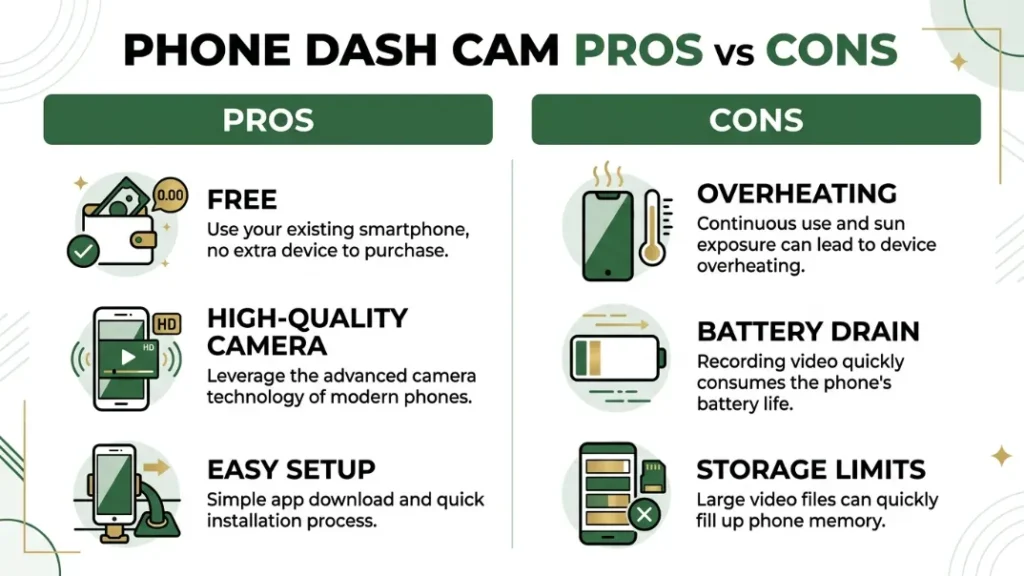
Using a phone as a dash cam offers convenience and cost savings, but it also brings issues like overheating, battery drain, and limited durability compared to dedicated dash cams designed for continuous use.
| Pros | Cons |
|---|---|
| Free if you already own a phone | Overheats in direct sunlight |
| High-quality camera | Battery drains quickly |
| Easy to set up | Storage fills up fast |
Key insight: phones work best for short-term or backup use.
Daily drivers may find the downsides frustrating.
Phone vs Dedicated Dash Cam: Which One Should You Choose?
A phone works as a temporary dash cam, but a dedicated device from brands like :contentReference[oaicite:9]{index=9} or solutions inspired by :contentReference[oaicite:10]{index=10} systems provide better reliability, heat resistance, and automatic recording for everyday driving.
| Feature | Phone | Dash Cam |
|---|---|---|
| Reliability | Medium | High |
| Heat Resistance | Low | High |
| Ease of Use | Manual | Automatic |
Rule: choose a phone for occasional use, not permanent setup.
If you drive daily, invest in a real dash cam.
What Problems Can Happen and How Do You Fix Them?
Common problems include overheating, storage limits, and unstable mounting, but you can fix them by using proper mounts, lowering video resolution, and managing storage with loop recording and regular file cleanup.
- Overheating: reduce screen brightness and avoid direct sun
- Storage full: enable loop recording
- Shaky video: use a strong mount
Tip:
Record in 1080p instead of 4K to save storage and reduce heat.
Small tweaks make a big difference in reliability.
How Can You Improve Video Quality and Reliability?
You can improve video quality by positioning your phone correctly, cleaning the lens, using proper resolution settings, and ensuring stable power so your recording stays clear and uninterrupted during every drive.
- Place camera at eye level
- Keep windshield clean
- Use steady mount
Rule: clarity depends more on stability than resolution.
Good positioning often beats expensive hardware.
Quick Summary
A stable mount, steady power, and proper settings give you the best results. Focus on clear view and consistent recording rather than high resolution alone.
When Should You Not Use a Phone as a Dash Cam?
You should avoid using a phone as a dash cam during long daily drives, extreme heat conditions, or when you rely heavily on your phone for navigation and calls, as these situations reduce safety and reliability.
Phones are not built for constant recording in hot cars.
Rule: do not risk your main device for long-term recording.
A phone dash cam works best as a backup, not a permanent solution.
Use it wisely depending on your driving habits.
Final Verdict: Is a Phone Dash Cam Worth It?
Yes, using your phone as a dash cam is worth it for short-term use, emergencies, or budget setups, but it cannot fully replace a dedicated dash cam for long-term reliability and consistent performance.
It solves a problem quickly and cheaply.
But it also creates new risks like overheating and battery drain.
I’m Alex Rahman, and I always suggest this simple rule.
Use your phone as a backup. Buy a dash cam for daily use.
Frequently Asked Questions
Can I use my phone as a dash cam without internet?
Yes, most dash cam apps work offline. They record video directly to your phone storage without needing internet access.
Does using a phone as a dash cam drain battery?
Yes, recording video drains battery quickly. Always connect your phone to a car charger while using it.
Is it safe to use my phone while driving?
No, you should never hold your phone while driving. Mount it securely and let the app record automatically.
Can a phone replace a dash cam completely?
No, a phone lacks durability and heat resistance. It works well as a temporary or backup solution only.
What is the best resolution for phone dash cam?
1080p offers the best balance of quality and storage. Higher resolutions increase heat and storage usage.
Do dash cam apps save important footage automatically?
Yes, apps with G-sensor features detect sudden movement and lock important clips to prevent deletion.

I’m Alex Rahman, a car enthusiast and automotive writer focused on practical solutions, car tools, and real-world driving advice. I share simple and honest content to help everyday drivers make better decisions.
