iZEEKER 2.5K Dash Cam Front: Honest 2026 Review Guide
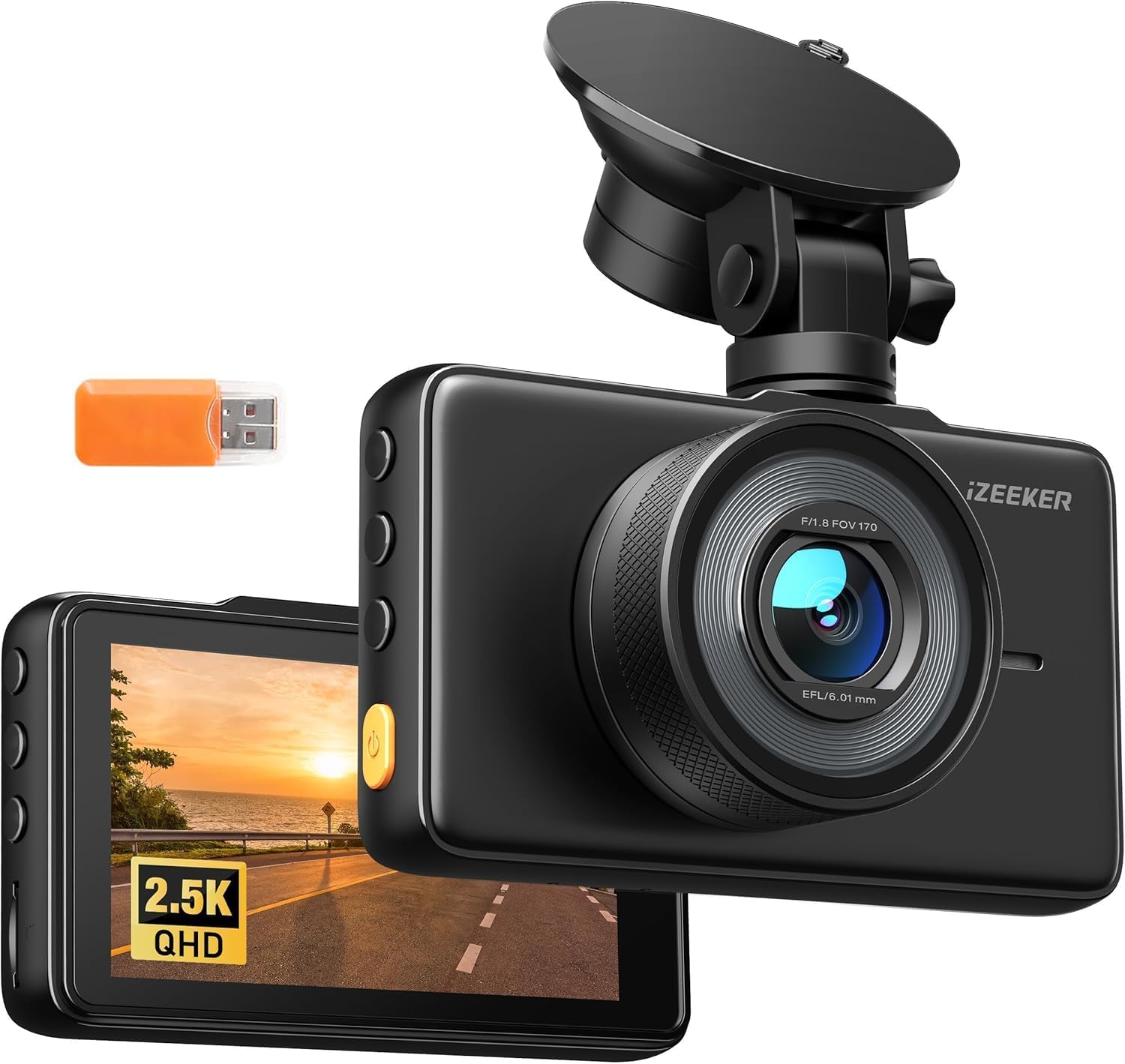
The iZEEKER 2.5K Dash Cam Front, 1440P QHD Car Camera with 3″ IPS Display | Night Vision, WDR, 170°Wide Angle, Loop Recording, G-Sensor, 24H Parking Mode, Easy Install, Portable, No SD Card is aimed at drivers who want a simple front-facing camera without paying for a premium dual-channel setup. Its main draw is 2560×1440P recording at 30fps, a 170° lens, a 3-inch display, WDR, loop recording, G-sensor locking, and listed 24-hour parking support.
Based on the current product data and recent buyer feedback, it offers strong value for basic accident evidence and daily commuting. The trade-offs are simple controls, no clearly advertised Wi-Fi or GPS, mixed reports about the suction mount, and night footage that is less convincing than daytime video.
| Overall: 4.1/5 | Performance: 4.1/5 |
| Value: 4.4/5 | Design: 3.8/5 |
| ✅ Best For: Budget-minded commuters who want clear front-road evidence | |
| ❌ Not Ideal For: Drivers who need GPS, app transfer, or front-and-rear coverage | |
| Price: Around $34–$40 recently; check Amazon for the live price | |
| Check Price on Amazon | |
First Look at the iZEEKER
The camera itself is compact and fairly plain. That works well in a car because it does not need to look flashy. The 3-inch screen is large enough to aim the lens, check settings, and review a clip without removing the memory card.
Current listing data shows a suction-style windshield mount plus car-power and USB cabling. Older mirrored listings sometimes mention a 32GB card, while the current product title says no SD card, so check the package contents before ordering. The housing is plastic, and the setup looks more practical than premium.
How the 2.5K Camera Performs
The core reason to buy this model is its 2560×1440P at 30fps front recording. That gives it more detail than a basic 1080p camera while keeping file sizes below many 4K models.
Daytime Highway Driving
In bright daylight, the 1440p resolution and 170° field of view are the iZEEKER’s strongest combination. Road signs, lane markings, and nearby vehicles should have enough detail for normal incident review. Buyer feedback is generally positive about daytime picture clarity, though fast-moving plates can still blur depending on speed, glare, and distance.
City Traffic and Hard Braking
The wide lens helps capture cross traffic and vehicles entering from the side. The built-in G-sensor is designed to lock an emergency clip after a sudden jolt. That is useful after a hard brake or collision, but an over-sensitive setting can create too many protected files, so it is worth checking the event folder from time to time.
Night Streets and Low Light
WDR and the listed night-vision feature help with streetlights and bright headlights, but this is still a budget camera. Recent review analysis shows night performance as a weaker area than daytime video. Expect useful context and vehicle shapes in lit streets, but not the same plate clarity you would get from a newer Sony STARVIS-based camera.
Rain, Glare, and Changing Light
WDR is helpful when the road has bright sky and darker shadows at the same time. In rain or at sunset, a clean windshield matters almost as much as the camera. Reflections, droplets, and oncoming lights can lower sharpness quickly, so the lens position should stay close to a clear part of the glass.
Loop Recording and Storage
Loop recording means the camera can keep writing new clips once the card fills by replacing older, unprotected video. The product data I could verify lists microSD storage and a 32GB support figure on several mirrored specifications. Because current package details vary, buy a compatible high-endurance card only after checking the live Amazon listing and manual.
Daily Use Without App Fuss
This is a simple dash cam, and that simplicity is part of the appeal. Power it from the car, let it start recording, and use the screen and physical controls when you need to check settings. There is no strong evidence in the current listing data that Wi-Fi or GPS is built in.
The downside is that retrieving footage is less convenient than on an app-connected camera. You may need to remove the microSD card or connect the camera by cable. Buyer reports also mention mixed suction-cup reliability, so check the mount after hot days or rough roads.
One small ownership detail matters: the built-in screen makes setup easier, but it can also tempt you to keep the display on while driving. Once the camera is aimed correctly, a dimmer or screen-off setting is usually less distracting. It is also worth reviewing one saved clip after installation. That quick check confirms the horizon is level, the windshield is not blocking the lens, the date and time are correct, and the memory card is actually writing files before you ever need the footage.
Build, Screen, and Mount
The iZEEKER uses a plastic body with a 3-inch IPS-style display and a suction windshield mount. It is compact enough for most windshields, but the screen makes it more visible than tiny hidden-style dash cams.
| Part | What to Expect |
| Lens | 170° wide-angle, F1.8 listed |
| Screen | 3-inch display |
| Mount | Suction windshield mount |
| Power | Car charger / USB connection |
The mount is the part to watch. Some owners say it holds well, while others report it loosening every few days. Keeping both the windshield and suction surface clean usually gives it the best chance of staying stable.
Video Quality After Dark
Day footage is the easier win. The 1440p image has enough resolution to preserve useful road detail, and WDR helps keep bright and dark areas from becoming completely washed out.
At night, expectations should be lower. Headlight glare, wet roads, and fast motion can reduce plate readability. The camera is still useful for showing traffic position, signal state, vehicle color, and the sequence of an incident, but drivers who prioritize low-light plate capture should consider a STARVIS-equipped model instead.
Keeping It Reliable
Maintenance is simple, but it matters. Wipe the lens with a clean microfiber cloth, keep the windshield clear around the camera, and check that the mount has not shifted. A slightly tilted lens can make a good recording much less useful.
| Task | Practical Habit |
| Lens | Clean when dusty or smeared |
| Memory card | Check and format periodically |
| Mount | Inspect after heat or bumps |
| Cables | Keep away from sharp trim edges |
If recording stops or clips become corrupted, the memory card is one of the first things to check. Buyer feedback includes some reports of recording failures, so using a reliable endurance card and checking saved clips occasionally is a smart habit.
iZEEKER Pros and Cons
The iZEEKER’s strengths are value, resolution, and simplicity. Its weaknesses are mostly the features missing from more expensive dash cams.
✅ Pros
| ❌ Cons
|
How It Compares
The iZEEKER sits between very cheap 1080p cameras and feature-rich 4K models. Two useful reference points are the Vantrue N1 Pro and ROVE R2-4K.
iZEEKER vs Vantrue and ROVE
The Vantrue N1 Pro is smaller and uses a Sony IMX323 sensor, but records at 1080p/30fps. The ROVE R2-4K adds 4K video, Wi-Fi, GPS, a Sony STARVIS IMX335 sensor, and larger card support, but normally costs more.
| Model | Main Strength | Trade-Off |
| iZEEKER 2.5K | 1440p value | No clear GPS/Wi-Fi |
| Vantrue N1 Pro | Compact Sony sensor | 1080p only |
| ROVE R2-4K | 4K, GPS, Wi-Fi | Higher price |
If you only want straightforward front evidence, the iZEEKER makes the most sense. If phone transfer and GPS matter, the ROVE is the more complete system. If size and simplicity matter more than resolution, the Vantrue remains a solid alternative.
Who Should Buy It?
Buy this if:
- You want better-than-1080p front footage.
- You prefer a screen over app-only controls.
- You want loop recording and G-sensor protection.
Avoid this if:
- You need front and rear recording.
- You want built-in GPS or phone Wi-Fi.
- Night plate capture is your top priority.
What About Long-Term Durability?
The current product data shows a 24-month warranty on several listing mirrors, which is reassuring for a budget camera. Long-term reliability will still depend on heat exposure, memory-card quality, cable wear, and how well the suction mount holds.
Review summaries are mixed on recording consistency and mount adhesion. That does not mean every unit will fail, but it is a reason to check footage once in a while instead of assuming the camera is always saving correctly.
Power and Installation
Installation is basic: mount the camera high on the windshield, aim the lens, route the power cable around the headliner and trim, then plug it into the car-power adapter. The exact power draw is not published in the sources I could verify.
The listing advertises 24-hour parking mode, but the exact continuous-power requirement is not clearly documented in the data I could confirm. For true engine-off monitoring, verify the live listing or manual for the required hardwire or constant-power setup before relying on overnight recording.
iZEEKER 2.5K Dash Cam FAQ
These are the practical questions most buyers should answer before choosing this camera.
Does the iZEEKER record in 2.5K?
Yes. The verified product data lists 2560×1440P recording at 30fps for the front camera.
Does it come with an SD card?
The current title says no SD card, while older mirrored listings sometimes mention a 32GB card. Check the live Amazon package contents before buying.
Can it record while the car is parked?
Parking mode is listed. However, confirm the exact power method needed for engine-off recording before relying on 24-hour coverage.
Does it have Wi-Fi or GPS?
Neither feature is clearly advertised in the verified current product data. If either is important, consider a model that explicitly lists it.
Is the night video good enough?
It is useful for general incident context, especially on lit roads, but recent buyer-feedback analysis suggests night performance is weaker than daytime clarity.
| Verdict: A good-value front dash cam for simple daily evidence. |
| Price: Around $34–$40 recently; check the live Amazon price. |
| Amazon rating: 4.2/5 from about 3,956 reviews in a recent tracker snapshot. |
| Check Current Price & Availability |
Final Verdict on the iZEEKER
The iZEEKER 2.5K Dash Cam Front makes sense for drivers who want a low-cost, front-only camera with sharper recording than basic 1080p models. The 1440p/30fps resolution, wide 170° lens, 3-inch screen, WDR, loop recording, and G-sensor cover the core features most commuters actually need.
Its limits are just as clear. Night footage is not its strongest area, the suction mount gets mixed feedback, and it lacks the clearly advertised GPS and Wi-Fi features found on more advanced models. At roughly the mid-$30 range when recently tracked, though, it is a practical value pick if your priority is simple road evidence rather than connected features.

I’m Alex Rahman, a car enthusiast and automotive writer focused on practical solutions, car tools, and real-world driving advice. I share simple and honest content to help everyday drivers make better decisions.
