GKU 4K Front Dash Cam Review: Discreet & Affordable
Finding the right balance between high-resolution video and a discreet physical design is one of the most common challenges when upgrading your vehicle’s security. The GKU 4K Front Dash Cam is designed specifically to address this, offering ultra-high-definition recording in a compact, screenless form factor that hides easily behind a rearview mirror.
Built primarily for daily commuters and budget-conscious drivers, this camera focuses on the essentials of front-facing traffic recording. By removing the built-in display and relying on a smartphone app via built-in WiFi, it reduces visual clutter on the windshield while keeping the price point accessible.
Reviewed Product
GKU 4K Front Mini Dash Cam
A stealthy, high-resolution front-facing camera managed entirely through a smartphone connection.
Rating:
★★★★☆
4.0/5
Research-based editorial assessment using verified product information, buyer-use factors, limitations, and comparison context.
Best For:
Commuters seeking an affordable, discreet 4K camera without the distraction of a glowing screen.
Key Specs
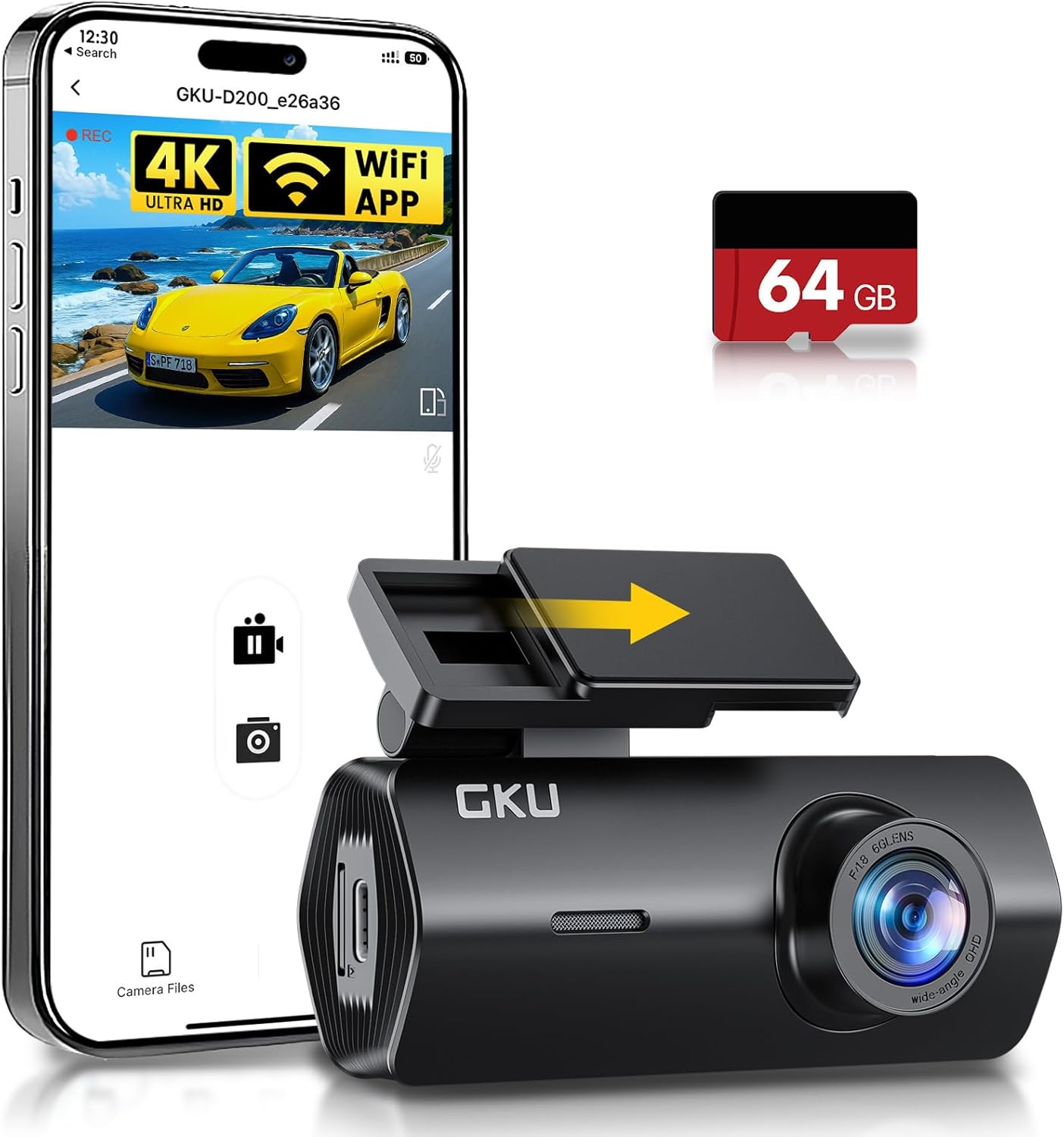
• 4K UHD Resolution • 170° Wide Angle Lens • Built-in WiFi • Included 64GB MicroSD Card
Key Advantage
Includes a 64GB memory card out of the box, eliminating the most common hidden cost of budget dash cams.
Main Trade-off
Relies entirely on app connectivity for setup and footage review, which may frustrate users wanting standalone operation.
Bottom Line
An excellent value for drivers who want simple front-facing protection and prefer a clean, minimal windshield setup. It lacks advanced dual-channel recording but excels at its core job.
At a Glance
- Records in 4K resolution for sharp license plate and sign legibility.
- Ships with a 64GB MicroSD card, providing immediate out-of-the-box readiness.
- Screenless tubular design hides completely behind most standard rearview mirrors.
- Built-in WiFi allows fast video downloading directly to Apple and Android devices.
- Requires an optional hardwire kit to utilize the 24-hour parking monitor features.
Verified Specifications & Buyer Implications
| Attribute | Verified Detail | Why It Matters |
|---|---|---|
| Resolution | 4K UHD (Front Only) | Provides enough pixel density to crop into the footage after an incident. This is crucial for identifying distant license plates or recognizing faces. |
| Field of View | 170 Degrees | Captures the lane directly ahead and adjacent lanes on both sides. It reduces blind spots at intersections during a traffic dispute. |
| Storage Inclusion | 64GB MicroSD Card | Eliminates the immediate need to purchase compatible high-endurance storage separately. The camera is ready to loop record immediately upon unboxing. |
| Connectivity | Built-in WiFi (App Required) | Since the camera lacks a screen, all alignment and footage retrieval must be done via smartphone. This provides a sleek design but requires basic technical comfort. |
| Parking Mode | 24-Hour Monitor (Kit Needed) | Records impact events while the vehicle is off. Buyers must purchase and route a separate hardwire kit to the fuse box to enable this feature. |
Design & Build Quality
The physical design of the GKU Mini Dash Cam prioritizes discretion over interactive hardware. By utilizing a screenless, cylindrical shape, the camera sits flush against the windshield glass, often disappearing entirely from the driver’s line of sight when mounted correctly.
The casing is constructed of lightweight matte black plastic, which resists windshield glare and blends seamlessly into darker car interiors. The mounting system relies on an adhesive pad rather than a suction cup, creating a stable, vibration-free connection that prevents shaky video during rough driving.
Setup & Ease of Use
- Insert the included 64GB MicroSD card into the designated slot before mounting.
- Clean the interior windshield glass thoroughly to ensure the adhesive mount secures properly.
- Plug the provided power cable into the vehicle’s 12V auxiliary outlet and route the wire neatly along the headliner.
- Download the companion mobile application and connect to the camera’s local WiFi network.
- Use the app’s live feed to physically rotate the camera lens and establish the correct recording angle.
How This Review Was Researched
This review evaluates the product using verified specifications, manufacturer documentation, current product information, and relevant comparison context. No personal hands-on testing is claimed unless testing evidence was actually provided.
Category-Specific Performance
Video Clarity & Resolution
Dash cameras exist primarily to provide undeniable proof during an incident, making sensor resolution the most critical performance factor. The 4K capabilities of this GKU model allow for much sharper digital zooming than standard 1080p cameras. This means buyers have a significantly higher chance of pulling readable characters from a moving license plate across multiple lanes of traffic.
Low-Light & Night Vision
Night driving introduces challenges with headlight glare and dark shadows, which budget cameras often struggle to balance. The implementation of Wide Dynamic Range (WDR) allows the sensor to adjust exposure automatically, bringing up details in dark street corners while suppressing the blowout caused by oncoming high beams. While it will not perform perfectly in pitch-black rural conditions, urban night driving footage remains clear and usable.
Field of View Coverage
A wide lens is essential for capturing context during an accident, such as a vehicle running a red light from a perpendicular street. The 170-degree lens spans nearly the entire forward view, catching the front corners of the hood and adjacent lanes. Buyers should understand that lenses this wide naturally introduce a slight fisheye distortion at the edges, though this does not negatively impact the evidentiary value of the footage.
Key Features Explained
Built-In WiFi & App Integration
Rather than relying on a small, hard-to-read screen on the device itself, this camera broadcasts a localized WiFi signal. Buyers can connect their smartphone directly to the camera to alter settings, view live footage, or download recorded clips immediately at the scene of an accident. This removes the need to carry an SD card reader or bring a laptop out to the vehicle.
Included 64GB Storage
Providing high-endurance memory out of the box is a substantial benefit that saves buyers around fifteen to twenty dollars. Because 4K video files are large, a 64GB card provides several hours of continuous drive time before the loop recording system begins overwriting the oldest footage.
G-Sensor & Loop Recording
Continuous recording is handled automatically, meaning the camera manages its own storage by deleting old, uneventful clips. However, when the built-in G-Sensor detects a sudden jolt, hard braking, or an impact, it instantly locks the current video file. This ensures that crucial accident footage cannot be accidentally overwritten as the driver attempts to pull over safely.
Real-World Usability & Maintenance
Living with a screenless dash cam is generally a “set it and forget it” experience. Because the camera lacks glowing buttons or a display screen, it rarely distracts the driver during nighttime travel.
Routine maintenance is minimal, though buyers should format the SD card through the mobile app approximately once every two months to prevent file corruption. The adhesive mount ensures the camera rarely falls down during extreme heat, a common frustration for drivers relying on traditional suction-cup mounts in summer weather.
Pros & Cons
Pros
- Sharp 4K video resolution
- 64GB memory card included
- Highly discreet screenless design
- Stable adhesive mounting system
Cons
- App reliance may annoy some users
- No rear-facing camera included
- Parking monitor requires extra wiring
Common Issues & Fixes
Smartphone Won’t Connect to WiFi
Cause: The phone’s cellular data connection is overriding the local camera network due to lack of internet.
Fix: Temporarily disable cellular data or allow the “keep trying WiFi” prompt in the phone’s settings before launching the app.
Camera Frequently Locks Normal Driving Files
Cause: The internal G-Sensor sensitivity is set too high for rough local roads or stiff vehicle suspensions.
Fix: Access the settings via the smartphone app and lower the G-Sensor sensitivity to medium or low.
What to Know Before You Buy
Buyers must understand that the “24H Parking Monitor” advertised heavily on the box is not an immediate plug-and-play feature. Because 12V auxiliary ports lose power when the engine shuts off, the camera requires constant power to watch the vehicle overnight.
To utilize this feature, buyers will need to purchase a specific hardwire kit separately. This involves running cables directly into the vehicle’s fuse box, a process that most drivers can do at home with a simple tutorial, but it does require some comfort working with basic automotive wiring.
Who Should Consider It / Who Should Look Elsewhere
Who Should Consider It
- Drivers wanting a hidden windshield setup
- Budget buyers wanting included storage
- Commuters prioritizing forward incident proof
Who Should Look Elsewhere
- Uber or Lyft drivers needing cabin recording
- Drivers preferring a built-in screen interface
- Those requiring rear-end collision monitoring
Alternatives to Consider
Reviewed Product
GKU 4K Mini
Best For: Budget-conscious minimalist drivers.
Key Specs: 4K resolution, 170° view, built-in WiFi.
Advantage: Free memory card included out of the box.
Trade-off: Single-channel front recording only.
Alternative A
VIOFO A119 V3
Best For: Buyers wanting a highly proven daily driver.
Key Specs: 2K Quad HD, built-in 2-inch screen, GPS included.
Advantage: Exceptional reliability and built-in screen.
Trade-off: Does not include an SD card with purchase.
Alternative B
REDTIGER F7N
Best For: Drivers needing comprehensive front and rear protection.
Key Specs: 4K Front + 1080P Rear, WiFi, GPS tracking.
Advantage: Complete two-channel video coverage.
Trade-off: Higher price tag and more complex installation.
Is It Worth It?
The GKU 4K Front Mini offers compelling value primarily due to its complete out-of-the-box readiness. By including the 64GB memory card, the true purchase cost remains low compared to competitors that require separate accessories. Buyers who want straightforward evidence collection for insurance claims without cluttering their dashboard will find excellent value here. However, drivers seeking comprehensive security against rear-end collisions should invest the extra money in a dual-channel alternative.
Final Verdict
The GKU 4K Dash Cam excels at delivering simple, high-definition forward recording in an exceptionally low-profile design. Its most important strength is the combination of 4K sensor clarity with bundled storage, ensuring an easy first-time buyer experience. The primary limitation is its lack of rear visibility and heavy reliance on smartphone connectivity. Ultimately, this camera is a sensible, cost-effective choice for commuters who want modern video protection that stays completely out of their way.
Frequently Asked Questions
Do I need an internet connection to use the camera’s WiFi?
No. The dash cam generates its own local WiFi network solely to connect to your smartphone. It does not use or require cellular data or external internet.
Can I view the footage on my computer instead of the app?
Yes. You can remove the MicroSD card from the camera and use an SD card reader to view or transfer the video files directly on a Mac or PC.
Will this camera drain my car battery overnight?
Not under standard use. If plugged into a standard 12V cigarette lighter port, it shuts down when the car turns off. If hardwired for parking mode, standard hardwire kits include a low-voltage cutoff to prevent battery drain.
Does it record audio inside the car?
Yes, by default. The built-in microphone records cabin audio, which is useful for interactions during traffic stops. This feature can be disabled within the app settings for privacy.
How much video can a 64GB card hold?
Approximately 3 to 4 hours of 4K footage. Once the memory is full, the loop recording feature automatically overwrites the oldest unlocked files to keep recording without manual intervention.
Affiliate disclosure: Leadfoot Automotive earns a small commission when you purchase through links on this page — at no extra cost to you. Our editorial process is independent: affiliate relationships never influence which products we recommend or how we rank them.

I’m Alex Rahman, a car enthusiast and automotive writer focused on practical solutions, car tools, and real-world driving advice. I share simple and honest content to help everyday drivers make better decisions.
