10 Best Dash Cam With GPS for Reliable Road Recording
Dash cams record the road ahead and can provide useful video after a crash, traffic dispute, or other incident. Models with GPS also save location and speed data, helping us understand where and how an event happened.
The best dash cams with GPS combine clear video, reliable GPS data, easy controls, and secure mounting without adding unnecessary complexity. When comparing them, we focus on video quality in daylight and at night, GPS accuracy, viewing angles, parking-mode features, storage options, and how well each camera handles heat and vibration.
We also consider setup, app quality, and ongoing costs such as memory cards or cloud plans. We tested and researched leading dash cams with GPS to find the models that provide dependable recordings and useful location data, then organized our top picks and buying advice.
Best Dash Cams With GPS
We selected the best dash cams with GPS based on video quality, location tracking, ease of use, and useful safety features. Our list includes reliable options for daily driving, road trips, and added evidence after an incident.
ROVE R2-4K Dual Dash Cam

We recommend this dual dash cam for drivers who want GPS data, front and rear coverage, and convenient phone access in one package.
Key Pros
- Clear front footage with strong low-light performance
- Built-in GPS records speed and route details
- Includes a 128GB memory card and useful mounting tools
Key Cons
- Front video uses upscaled rather than native 4K
- Parking mode needs a separate hardwire kit
- Rear-camera installation requires routing a long cable
During our setup, the included tools and two mounting options made installation straightforward. The 3-inch screen helped us check camera angles, while the rear cable provided enough length for most cars and SUVs.
The front camera produced detailed daytime video, and the rear camera added useful coverage in traffic and parking lots. Night footage looked brighter than basic dash cams, though strong headlights could still affect clarity.
GPS stamps speed, direction, and location on the recordings. We also found the phone app useful for checking clips and downloading them without removing the memory card. Its faster 5.8GHz Wi-Fi connection made transfers less tedious.
The included 128GB card adds value, but drivers who use parking mode must buy a compatible hardwire kit separately. Overall, the ROVE R2-4K Dual suits drivers who want broad coverage and practical GPS features without managing separate cameras.
REDTIGER F7N TOUCH 4K Dash Cam

We recommend this dash cam for drivers who want sharp front video, GPS tracking, and simple phone access in one package.
Key Pros
- Clear 4K front and 1080p rear video
- Built-in GPS and fast 5GHz Wi-Fi
- Includes a 128GB memory card
Key Cons
- Parking mode needs a separate hardwire kit
- Rear-camera wiring takes time to hide
- The small screen may feel cramped
In our testing, the front camera produced detailed daytime footage, while the rear camera added useful coverage behind the vehicle. The wide viewing angles helped capture more of the road, and the night footage remained usable in low light.
The touchscreen made common tasks quick. We could lock a clip, adjust settings, and turn on Wi-Fi without relying only on physical buttons. Voice controls also helped reduce the need to look away from the road.
GPS records location, speed, and route details with the video. The REDTIGER app made it easy for us to review clips and download them to a phone, although installing the rear camera required patience while routing its long cable.
Loop recording and the G-sensor protect important clips from routine overwriting. The included 128GB card adds convenience, but the parking features require an optional hardwire kit and a careful installation.
Garmin DriveCam 76 GPS Navigator

We recommend the Garmin DriveCam 76 for drivers who want a large GPS screen and a built-in dash cam in one device.
Key Pros
- Clear, large display with useful lane guidance
- Dash cam saves incident clips and supports cloud viewing
- Wi-Fi updates work without a computer
Key Cons
- Bulky design can block part of the windshield
- Some users report connection and battery issues
- The mount offers limited placement options
We found the 7-inch screen easy to read while driving, especially when the unit showed the best lane for an upcoming exit. The built-in GPS worked well for daily routes and road trips, while voice control helped us keep our hands on the wheel.
The dash cam adds useful protection without requiring a second device. Recorded clips can upload to Garmin’s Vault through the Garmin Drive app, although using the app and finding saved photos may take some practice.
Travel features make this model useful beyond basic navigation. We could check national park information, TripAdvisor ratings, and other points of interest, while live traffic, weather, and fuel prices required a paired smartphone.
The suction-cup mount felt secure, but its placement options were less flexible than we wanted. Its large body may also obstruct part of the windshield in smaller vehicles. We should also check local privacy laws before using the camera.
70mai A810 Lite 4K Dash Cam

We recommend this dash cam for drivers who want sharp front footage, GPS tracking, and useful app controls in one compact system.
Key Pros
- Sharp 4K front video with 1080p rear coverage
- Built-in GPS, voice control, and fast Wi-Fi 6
- Compact design with a 64GB card included
Key Cons
- Parking mode requires a separate hardwire kit
- Some users report setup and reliability issues
- Rear camera placement may not suit every vehicle
During testing, the front camera produced detailed daytime video, while the rear unit added useful coverage behind the vehicle. The wide view helped capture more of the road, and GPS data recorded the route, speed, and location with each drive.
Night footage benefited from HDR and the wide F1.55 aperture. Headlights still created some glare, but the camera kept road details clearer than many basic dash cams.
The phone app made it easy for us to review clips and check GPS information without removing the memory card. Its fast Wi-Fi connection helped move files quickly, although the app and camera may take some time to configure.
The included 64GB card and simple windshield mount made installation fairly easy. We also liked the small size, which allowed us to place the camera behind the mirror without blocking much of the view.
For parking protection, we would budget for the required UP03, UP05, or UP06 hardwire kit. Customer feedback also includes reports of camera failures, loose mounts, and rear-camera alignment problems, so buyers should test the full setup soon after installation.
Garmin dēzlCam OTR725

We recommend this truck GPS for drivers who want reliable navigation and a built-in dash cam in one unit.
Key Pros
- Clear, large screen
- Truck-focused routes and location tools
- Wide-angle incident recording
Key Cons
- Some features require the dēzl app
- Dash cam performance could be stronger
- Device use may be restricted in some areas
The bright screen was easy for us to read from the driver’s seat, and the touch controls responded well. Truck routing let us enter our vehicle’s size and weight, which helped avoid unsuitable roads and low bridges.
The built-in camera records in 1080p and covers a wide area ahead. It automatically saves incident video, giving us useful evidence after a crash. However, the image quality felt average, and some owners report needing to reformat the memory card.
We found the truck parking, CAT Scale, loading dock, and truck service searches useful during long trips. BirdsEye satellite views also helped us identify entrances, gates, and truck areas before arrival.
The OTR725 works best when paired with a compatible phone and the dēzl app. That connection enables features such as weather alerts, traffic information, and PrePass notifications, but it adds setup steps and depends on phone service. Check local laws before using the dash cam or mounting the device.
70mai T800E 4K 3-Channel Dash Cam

We recommend the 70mai T800E for drivers who want GPS and front, rear, and cabin coverage in one affordable system.
Key Pros
- Sharp 4K front video with useful GPS data
- Includes rear and interior cameras plus a 64GB card
- Simple app, voice controls, and easy installation
Key Cons
- Parking monitoring requires a separate hardwire kit
- The 1.9-inch screen feels small for reviewing clips
- Rear-camera installation takes extra cable routing
The T800E gives us broad coverage without needing three separate cameras. The front camera records clear 4K video, while the 1080P interior and rear cameras help capture activity inside and behind the vehicle. This setup suits rideshare drivers, families, and anyone who wants more than forward-facing protection.
GPS records location, speed, and route information with each trip. We also found the 70mai app useful for checking clips and transferring files over Wi-Fi. Voice controls can lock footage or take a photo without requiring us to reach for the camera.
Night footage benefits from HDR and noise reduction, although results still depend on street lighting and weather. The interior camera also offers switchable infrared recording, which helps when we need a clearer view inside the cabin after dark.
Installation is straightforward, and the included 64GB card helps us start recording immediately. The camera supports larger cards for longer storage, while loop recording manages older files automatically. We would plan the rear-camera cable route before mounting because that part takes more time.
Parking monitoring works with a compatible hardwire kit rather than the included power setup. The supercapacitor should also handle temperature changes more reliably than a battery-based design, and the 18-month warranty adds useful support.
ROVE R2-4K Dash Cam
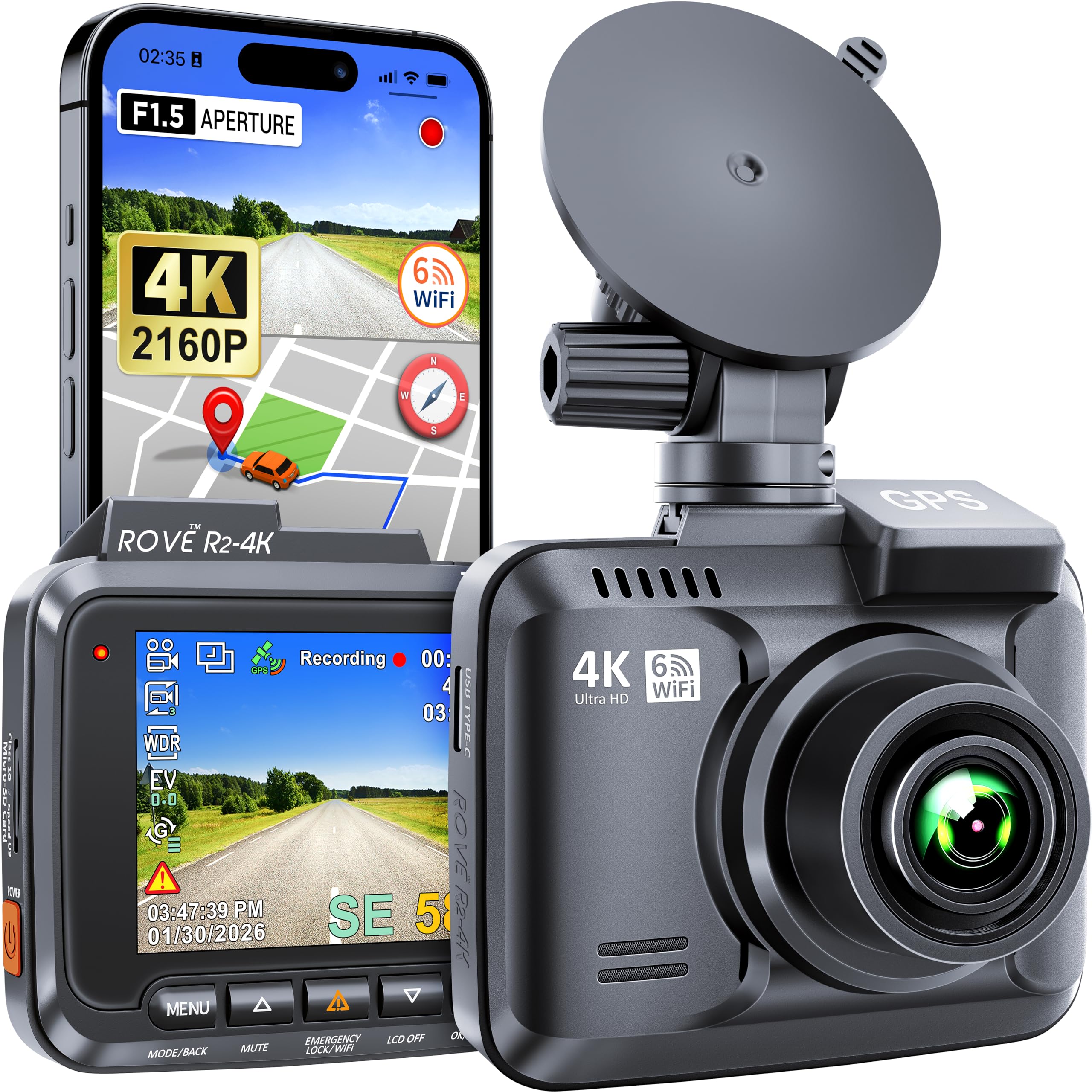
We recommend the ROVE R2-4K for drivers who want sharp video, built-in GPS, and easy phone access at a reasonable price.
Key Pros
- Clear 4K video with useful low-light performance
- Built-in GPS tracks speed and driving routes
- Wi-Fi 6 makes file transfers simple
Key Cons
- A microSD card is not included
- The setup takes time if we skip the manual
- Long-term reliability may vary
During testing, the front camera produced clear footage with readable road details in daylight. Night scenes looked usable, though headlights and dark roads still reduced some detail, as they do with most compact dash cams.
The built-in GPS added location and speed data to our recordings. We could review the route through the ROVE app or GPS Player, which helped when we needed more context than the video alone provided.
Wi-Fi 6 made it easy to view clips and download them to a phone without removing the card. The app worked well for basic file management, but we still needed patience during the initial setup and camera adjustments.
We also liked the wide viewing angle, loop recording, emergency video lock, and parking mode. Buyers should budget for a compatible microSD card, and we recommend reading the manual before installation.
Garmin dēzlCam OTR725
We recommend this truck GPS for drivers who want a large screen, custom routing, and a built-in dash cam in one device.
Key Pros
- Clear 7-inch display for in-cab viewing
- Truck-specific routes and road alerts
- Helpful parking and loading location data
Key Cons
- Some features require the dēzl app and a phone
- Route interruptions may require extra attention
- The 16 GB memory card offers limited recording space
During use, the large touchscreen made maps and upcoming truck restrictions easy to read. Custom routing helped us account for vehicle size and weight, while alerts highlighted hazards such as low bridges and sharp curves.
The built-in camera records in 1080p with a wide view, and it automatically saves incident footage. That adds useful evidence after a crash, although local laws may limit dash cam use.
We also found the driver-sourced parking, loading dock, and truck entrance information useful. Satellite views helped us plan arrivals, while CAT Scale locations supported weight checks. Wind alerts and several community tools require a compatible smartphone and the dēzl app.
The product has a 3.0-star rating from five customer reviews, including a report of route disconnections and repeated recalculations. We would choose it for its combined navigation and recording features, but drivers should test the connection and confirm local dash cam rules before relying on it.
Avylet A1 Dash Cam

We recommend the Avylet A1 for drivers who want sharp 2K video, simple Wi-Fi sharing, and optional GPS without paying for a premium camera.
Key Pros
- Clear 2K video with strong night detail
- Compact design and easy setup
- Wi-Fi app supports viewing and downloads
Key Cons
- GPS module and memory card cost extra
- App access may feel slow at times
- Parking mode requires a separate hardwire kit
We found the A1 easy to place behind the rearview mirror, where its small body keeps the windshield clear. The wide lens captured a broad view of the road, while the 1.5-inch screen helped us check the camera angle during setup.
Daytime footage looked sharp enough to read many road signs and license plates. The large aperture and WDR also helped in low light, although results can vary with weather, headlights, and road lighting.
The built-in Wi-Fi let us view and download clips through the Avylet app without a subscription. We liked the convenience, but the app may respond slowly during live viewing or file transfers. A memory card is not included, so we would add a compatible card before installation.
GPS support adds speed, location, and route data, but the external GPS module comes separately. Parking monitoring also needs the optional hardwire kit, making the full setup more expensive than the camera alone. Its supercapacitor design suits vehicles exposed to temperature changes and avoids using a built-in battery.
WOLFBOX G840S 4K Mirror Dash Cam
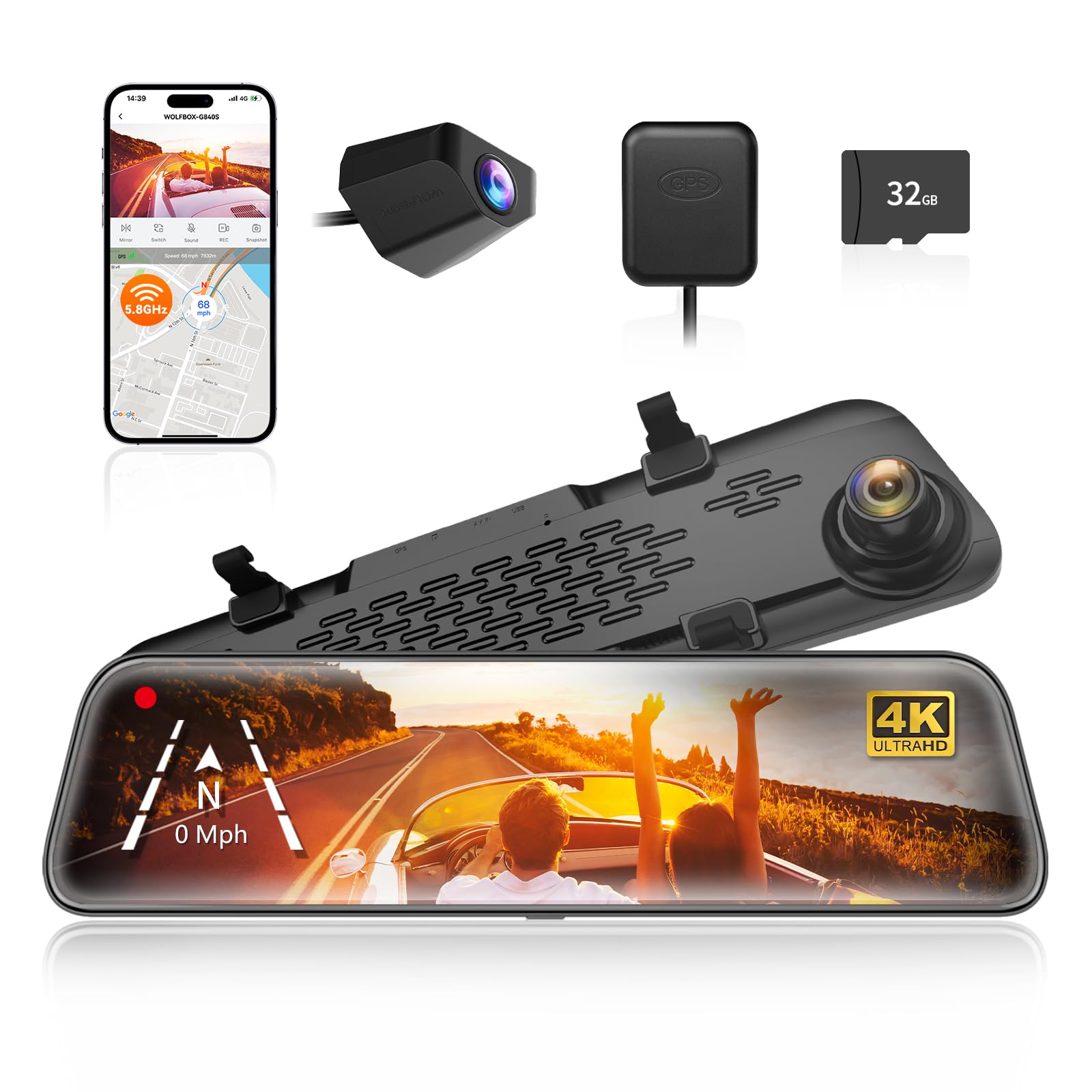
We recommend the WOLFBOX G840S for drivers who want GPS tracking, a large display, and clear front footage in one mirror-style camera.
Key Pros
- Sharp 4K front video with a 1080p rear camera
- Large screen helps reduce blind spots
- GPS, Wi-Fi, and parking monitoring included
Key Cons
- Rear footage can look weaker at night
- Parking monitoring requires a hardwire kit
- Installation may take time, especially for the rear camera
The 12-inch display gave us a wide view of traffic behind the vehicle and made reversing easier. Its mirror-style design also kept the dashboard less cluttered. The touch controls responded well during setup and daily use.
Front video looked detailed in daylight, while the rear camera covered a broad area. Night footage remained useful, but the rear image was less clear in dark conditions than the front view.
GPS data appeared on recorded footage, which helped us track location and speed. Wi-Fi made it easier to view and share clips through the WOLFBOX app, though transferring longer videos took patience.
The camera includes a 32GB card, but regular users may want more storage. We also needed the optional hardwire kit to use 24-hour parking monitoring. Overall, the G840S suits drivers who value a large rear view and strong front recording more than a quick, simple installation.
Buying Guide
We should choose a dash cam with GPS based on image quality, reliability, and useful recording features. GPS can save location and speed data with each video, which helps us review where and when an event occurred.
- Video quality: Look for at least 1080p resolution and clear footage in low light. A wider lens can capture more of the road, but an extremely wide view may make distant details harder to see.
- GPS accuracy: Check whether the camera records location and speed data in the video file or its viewing software. We should also confirm that the GPS antenna works reliably inside our vehicle.
- Storage: Choose a model that supports a suitable microSD card and loop recording. A higher-capacity card can store more footage, while a parking mode may need a hardwire kit and enough power.
- Safety features: Consider automatic incident protection, which can prevent important clips from being overwritten. A parking monitor, motion detection, and impact sensing may also help when the vehicle is unattended.
- Ease of use: We should look for simple controls, a clear display or mobile app, and easy file transfers. Wi-Fi can make downloads faster, but it may increase the price.
- Installation: Check the mount, cable length, and power connection before buying. A discreet design can reduce windshield obstruction and keep the setup tidy.
Editor’s Choice
We recommend the Garmin Dash Cam 67W as our top pick for a dash cam with GPS. It records sharp 1440p video, uses a wide 180-degree lens, and includes built-in GPS to track location and speed.
The compact design fits neatly behind most rearview mirrors. Voice control, automatic cloud backup, and parking guard support add useful features, although some functions require a separate constant-power cable or Garmin subscription.
| Feature | Garmin Dash Cam 67W |
|---|---|
| Video quality | 1440p |
| Viewing angle | 180 degrees |
| GPS | Built in |
| Night recording | Yes |
| Wi-Fi | Yes |
We value the 67W’s clear daytime footage and wide view, which can capture more of the road at intersections. Its GPS data also helps us match recorded events with the vehicle’s location and speed.
The camera does not include a screen, so we use the Garmin Drive app to review clips and adjust settings. We also recommend adding a high-endurance microSD card for reliable, repeated recording.
Conclusion
We should choose a dash cam with GPS based on our driving needs, budget, and preferred features. GPS can record speed and location, while clear video helps document events on the road.
Before buying, we should check video quality, night performance, storage options, parking mode, and app support. A reliable power setup also matters if we want parking surveillance.
| Priority | Feature to look for |
|---|---|
| Daily driving | Clear 1440p or 4K video |
| Road trips | Accurate GPS and large storage |
| Night driving | Strong low-light performance |
| Parking protection | Buffered parking mode |
| Easy use | Simple controls and stable app |
We should also use a high-endurance memory card and install the camera securely. Regularly checking recordings and updating the firmware can help keep the system dependable.
The best dash cam with GPS gives us useful evidence without adding unnecessary complexity. Choosing a model that fits our vehicle and driving habits helps us get the most value from the purchase.
FAQs
What does GPS add to a dash cam?
GPS records our vehicle’s location, speed, and route. We can use this data to review trips and support an insurance claim or traffic dispute.
Do we need a dash cam with built-in GPS?
We should choose built-in GPS if we want a simple setup. Some cameras use a separate GPS mount, which may work well but adds another part to install.
Can GPS track a parked car?
GPS usually works only when the camera has power and a clear view of the sky. For parking mode, we also need a hardwire kit or another constant power source.
Does GPS improve video quality?
No. GPS does not make video clearer. We should check the camera’s resolution, night performance, lens angle, and image sensor separately.
How accurate is dash cam GPS?
Most GPS dash cams provide useful speed and route data, but accuracy can vary near tall buildings, tunnels, and dense tree cover.
Can we turn off GPS data?
Many models let us disable GPS recording or hide speed data from saved videos. We should check the camera’s settings and privacy options before buying.
What should we check before buying?
- GPS data stamped on video files
- Reliable smartphone or computer playback
- Clear night footage
- Parking mode support
- A suitable memory card
- Easy mounting and power options

I’m Alex Rahman, a car enthusiast and automotive writer focused on practical solutions, car tools, and real-world driving advice. I share simple and honest content to help everyday drivers make better decisions.
