10 Best Dash Cam for Car: Top Picks for Clearer Driving Evidence
Dash cams record the road ahead and can provide useful video after a crash, theft, or other dispute. Many models also offer features such as night vision, parking monitoring, GPS, and smartphone access. A good dash cam should capture clear footage without distracting you while driving.
When choosing the best dash cam for your car, we focus on video quality, a wide viewing angle, reliable mounting, easy controls, and storage that will not fill too quickly. We also consider whether each model works well in low light, handles heat, and includes important features without raising the price too much.
We tested and researched dash cams to find the models that provide clear evidence, dependable performance, and useful features for different drivers.
Best Dash Cams for Cars
We reviewed the top dash cams for video quality, ease of use, storage, and helpful safety features. Our list includes options for different budgets and driving needs.
ROVE R2-4K Dual Dash Cam

We recommend this dash cam for drivers who want front-and-rear coverage, quick phone access, and useful GPS records without buying a memory card separately.
Key Pros
- Sharp front footage with clear daytime detail
- Fast Wi-Fi transfers through the ROVE app
- Includes a 128GB microSD card and mounting tools
Key Cons
- Front video uses upscaled rather than native 4K
- Parking mode needs a separate hardwire kit
- Rear-camera wiring takes time to hide neatly
The R2-4K Dual gave us broad coverage from both ends of the car. The front camera records native 1440p footage and upscales it to 4K, while the rear camera records in 1080p. Daytime video looked detailed enough for road signs, nearby vehicles, and traffic events.
Low-light performance was another strong point. The Sony STARVIS 2 sensor and HDR helped keep nighttime footage visible, though very dark roads and bright headlights still reduced detail. The wide viewing angles also captured more of the lanes around us.
We found the ROVE app useful when we needed to check or share a clip. Its 5.8GHz Wi-Fi connection moved files to our phone faster than many basic dash cams. Built-in GPS added speed, direction, and route data to recordings, which can help when reviewing an incident.
Installation includes both suction and adhesive mounts, a rear-camera cable, trim tools, clips, and a 128GB card. Routing the long rear cable took some effort, but the included tools made the job easier. The 3-inch screen also helped us aim both cameras during setup.
Parking mode offers time-lapse, motion, and collision options, but we would need to add a compatible hardwire kit for continued monitoring while parked. Overall, this model suits drivers who want a well-equipped dual-camera system with convenient phone controls and solid everyday video quality.
REDTIGER F7N TOUCH Dash Cam

We recommend this dash cam for drivers who want sharp front video, useful rear coverage, GPS, and easy phone access in one package.
Key Pros
- Clear 4K front video with strong daytime detail
- Simple touchscreen, voice controls, and phone app
- Includes a 128GB memory card and rear camera
Key Cons
- Parking monitoring needs a separate hardwire kit
- Rear-camera wiring takes time to hide neatly
- Night footage may vary with weather and road lighting
The REDTIGER F7N TOUCH gives us a clear view of the road, especially during the day. Its 4K front camera captures useful details, while the 1080p rear camera adds protection behind the car. The wide viewing angles also cover more of each lane.
We found the touchscreen easier for quick tasks than relying only on a phone. Voice commands help us save clips or control the camera without reaching toward the display. The 5GHz Wi-Fi connection also makes downloading videos faster than many basic dash cams.
Installation feels manageable with the suction mount, clips, and long rear-camera cable. Still, running the cable through the vehicle takes patience if we want a clean finish. The included 128GB card provides plenty of space, and loop recording replaces older files automatically.
Built-in GPS records route and speed information with each clip. The impact sensor can protect footage after a collision, while parking monitoring adds another layer of coverage. We need the optional hardwire kit for that feature, so buyers should include its cost in the budget.
REDTIGER F7NP 4K Dash Cam

We recommend this dual-camera dash cam for drivers who want clear front and rear footage, simple phone access, and a memory card included.
Key Pros
- Sharp front video with useful rear coverage
- Fast Wi-Fi transfers and built-in GPS
- Compact design with a supercapacitor
Key Cons
- Parking mode requires a separate hardwire kit
- Rear-camera installation takes some effort
- App connection may need occasional troubleshooting
We found the F7NP easy to mount and fairly discreet on the windshield. The included cables provide enough length for a clean rear-camera installation, especially when routed behind the headliner and trim.
Front footage looks detailed in daylight, while the rear camera adds helpful coverage in traffic and parking lots. Its low-light performance is solid for routine driving, though glare and very dark roads can still reduce detail.
The phone app makes it easier to preview clips, adjust settings, and download recordings without removing the memory card. Built-in GPS also adds route and speed information, which can help when reviewing an incident.
Loop recording keeps the camera running without manual file management, and the included 128GB card lets us start using it immediately. We would still check the card regularly, since continuous 4K recording places heavy demands on storage.
The parking features are useful, but continuous monitoring needs the optional hardwire kit. Overall, the F7NP offers strong coverage and practical features for its price, with installation and app reliability as the main trade-offs.
70mai A810 Lite 4K Dash Cam

We recommend this dash cam for drivers who want sharp front footage, useful rear coverage, and strong app features without moving to a high-end system.
Key Pros
- Clear 4K front video with solid detail
- Rear camera adds helpful coverage
- Fast phone transfers over Wi-Fi 6
Key Cons
- Parking mode needs a separate hardwire kit
- Rear-camera wiring takes extra time
- App setup may require some patience
We found the A810 Lite easy to mount behind the mirror, where its compact body stayed out of the way. The front camera produced clear daytime footage, while the rear unit gave us useful coverage behind the car. Running the rear cable took more effort than installing the main camera.
At night, HDR and the wide lens helped balance headlights and darker areas. Footage remained useful in rain and low light, though results can still vary with road lighting and weather.
The app made it simple for us to review clips, check GPS data, and move videos to a phone. Wi-Fi 6 helped speed up transfers, but the 4G remote-view feature requires a compatible hardwire kit and added service considerations.
We also liked the built-in GPS, voice controls, and supercapacitor design. Drivers who want parking monitoring should plan for the extra hardwire purchase, but this package offers a strong mix of image quality, coverage, and everyday convenience.
BOTSLAB G980H 4-Channel Dash Cam
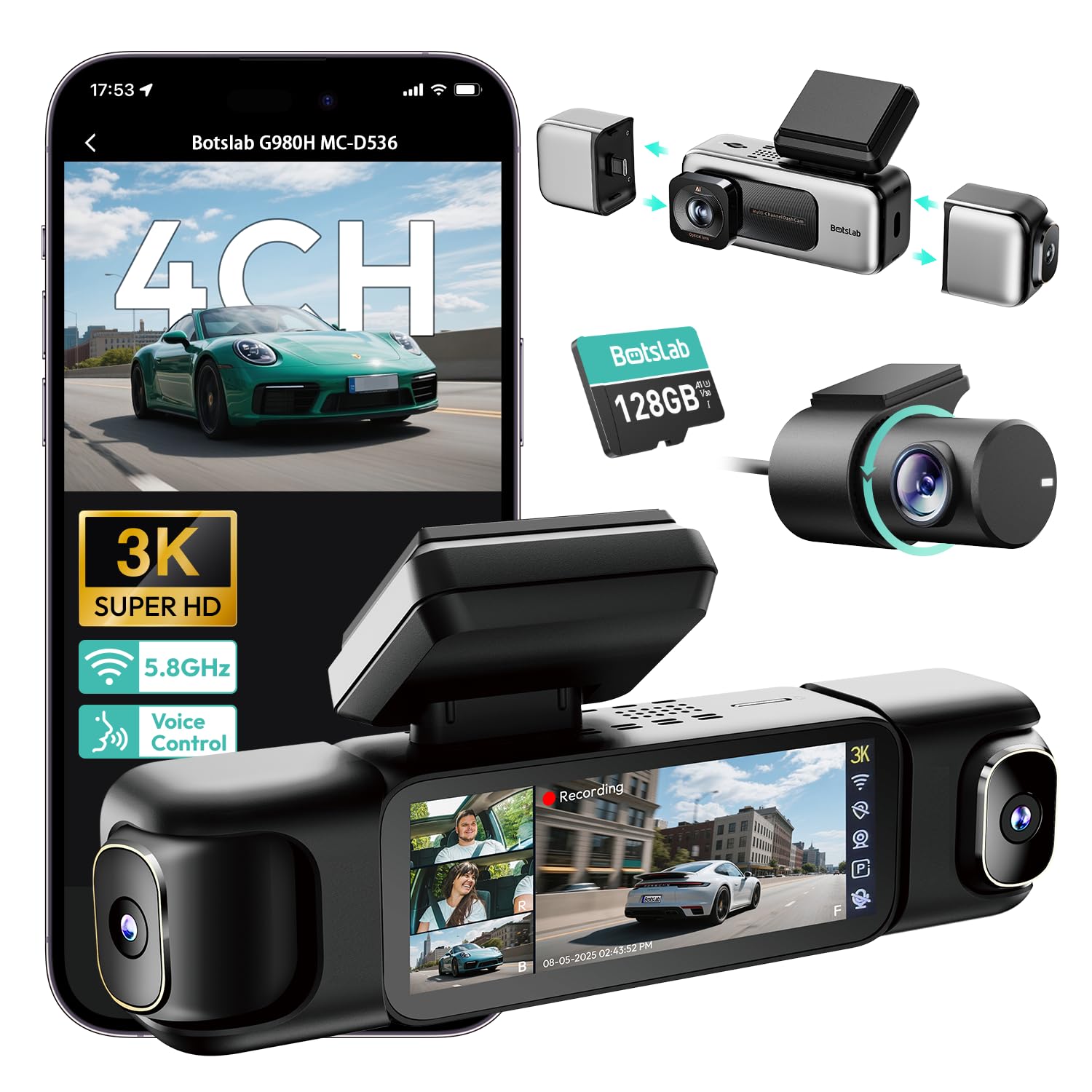
We recommend this dash cam for drivers who want broad coverage, clear video, and several control options in one system.
Key Pros
- Four cameras cover the front, sides, and rear.
- Includes a 128GB memory card and built-in GPS.
- Touch, voice, and app controls make daily use easier.
Key Cons
- Installation takes time because the system has several cameras and cables.
- Parking mode requires a separate hardwire kit.
- Some users report app privacy concerns and occasional hardware issues.
During our setup, the cameras provided a wide view around the vehicle, which helps capture activity beside the car as well as ahead and behind it. The side cameras use magnetic mounts, so we could adjust or remove them without much effort.
The front footage looked sharp in daylight, while the wide-aperture lens and infrared lighting helped in darker areas. The 3.18-inch screen also made it easy for us to check all four views without switching between camera feeds.
We liked having voice control for basic actions while driving. Built-in GPS adds location and speed data to recordings, and the 5.8GHz Wi-Fi connection made short video transfers quicker than standard Wi-Fi.
Installation took more work than with a basic front-and-rear camera. We needed time to route the cables and hide them behind the interior trim. Parking monitoring also requires BOTSLAB’s separate hardwire kit, which adds cost and installation work.
The camera includes a 128GB card and supports larger cards up to 512GB. We would choose this model for larger vehicles, rideshare drivers, or anyone who wants coverage from several angles, but a simpler two-camera system may suit drivers who want faster installation.
REDTIGER F17 4K 3-Channel Dash Cam

We recommend this dash cam for drivers who want clear front footage plus rear and cabin coverage in one system.
Key Pros
- Sharp front video with useful low-light detail
- Three-camera coverage for added protection
- Fast phone transfers through 5GHz Wi-Fi
Key Cons
- Parking monitoring requires a separate hardwire kit
- Rear footage can look dark in some conditions
- The adhesive mount may be difficult to reposition
We found the F17 straightforward to mount and use. Its front camera records in 4K, while the rear and cabin cameras add coverage that a standard dash cam cannot provide. This setup suits family cars, rideshare vehicles, and anyone who wants to record inside the car.
Daytime footage looks crisp, and the front camera does a good job capturing road details. Night footage remains usable, although the rear camera may appear darker depending on the angle and lighting.
The built-in display helps us check recordings without a phone. When we need to save or review clips, the app connects over Wi-Fi and transfers files quickly. GPS also records route information, which can help provide context after an incident.
Parking protection works with collision detection and time-lapse options, but we need the optional hardwire kit for this feature. The supercapacitor should also handle temperature changes better than a battery-based design, and REDTIGER includes an 18-month warranty.
IIWEY N6 360° Dash Cam
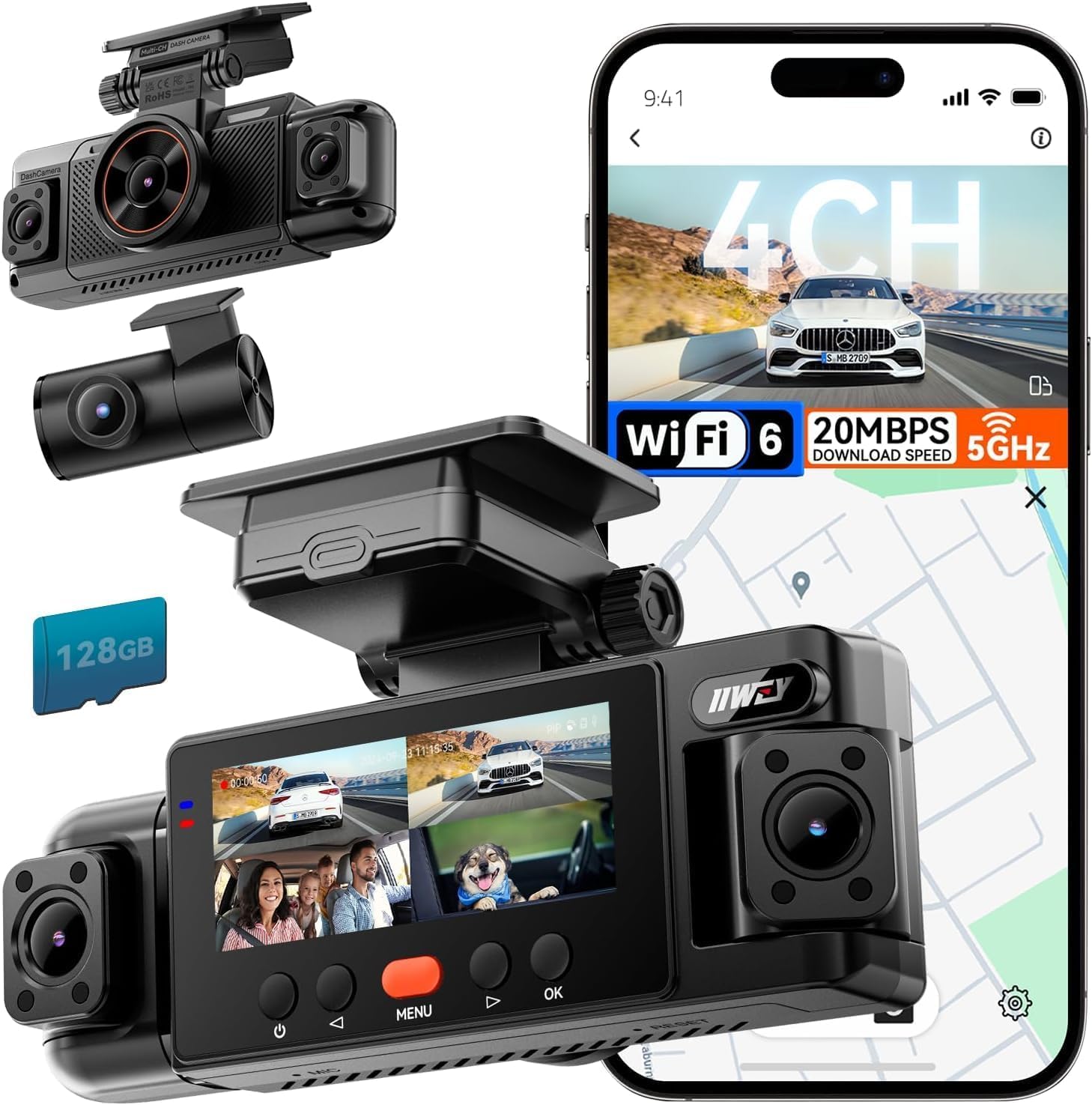
We recommend this dash cam for drivers who want broad four-camera coverage and simple daily recording without paying for a separate memory card.
Key Pros
- Covers the front, rear, and both sides
- Includes a 128GB memory card
- Wi-Fi, GPS, and night vision work well for routine use
Key Cons
- Parking mode requires a separate hardwire kit
- Side cameras may need careful adjustment
- Headlight glare can affect some night footage
We found the four-channel setup useful in busy parking lots and at intersections. The front and rear views provide clear daytime footage, while the side cameras help show nearby vehicles and blind spots.
Night recording remains useful, especially around streetlights. However, bright headlights can create glare, so we would not expect perfect plate visibility in every situation.
Setup was straightforward with the included car charger and mounting parts. The free app lets us review and download clips over Wi-Fi, while GPS adds route and speed information to playback.
The camera does not have a built-in battery for normal operation. Drivers must keep it connected to power, and the optional hardwire kit is required for parking surveillance. We also found the compact screen and loop recording helpful for checking that the camera was working during trips.
70mai T800E 4K 3-Channel Dash Cam

We recommend this dash cam for drivers who want front, rear, and cabin coverage with sharp daytime video and useful app controls.
Key Pros
- Clear 4K front video helps capture road details.
- Three-camera coverage records the cabin and rear view.
- Includes a 64GB card, GPS, voice control, and Wi-Fi 6.
Key Cons
- Parking monitoring requires a separate hardwire kit.
- The small display limits on-camera viewing.
- Rear-camera installation takes extra time.
The front camera gives us detailed footage, while the interior and rear cameras cover areas a single dash cam misses. This setup suits rideshare drivers, family vehicles, and anyone who wants more complete coverage.
We found the adhesive mounting system simple to use, and the included memory card helped us start recording without buying extra accessories. The 70mai app also makes it easier to review and transfer clips than using the small built-in screen.
At night, HDR and noise reduction help maintain useful image quality. The interior camera’s infrared option can improve cabin footage in low light, though the results still depend on the vehicle’s lighting and window conditions.
GPS adds location and speed data to recordings, while voice controls let us save clips or take photos without reaching for the camera. Parking monitoring adds protection when connected to a compatible hardwire kit; it does not provide continuous operation from the standard power connection alone.
The T800E uses a super capacitor and carries an 18-month warranty. We would choose it for broad camera coverage and strong front video, but buyers should plan for a longer installation if they want the rear camera and parking mode fully set up.
VIOFO A229 Plus

We recommend the VIOFO A229 Plus for drivers who want clear front and rear footage, strong night performance, and useful phone controls.
Key Pros
- Clear 2K video from both cameras
- HDR helps capture details in changing light
- Fast 5GHz Wi-Fi and accurate GPS
Key Cons
- Memory card sold separately
- Parking mode requires a separate hardwire kit
- Setup takes some time, especially for the rear camera
We found the A229 Plus easy to position because its front and rear cameras are compact. The included rear cable gives us enough reach for most cars, while the trim tool helps keep the installation tidy.
During daytime driving, both cameras produce sharp footage with natural color. HDR improves detail when bright skies and darker roads appear together. We also like the front camera’s smoother recording option, though enabling HDR limits it to a lower frame rate.
Night footage remains useful in areas with limited light. The STARVIS 2 sensors reduce blur and noise, helping us read more of the scene when nearby vehicles move quickly. The wide view covers several lanes without making the image look overly distorted.
The VIOFO app lets us preview and download clips over 5GHz Wi-Fi. Transfers feel quicker than many older dash cams, but we still prefer downloading large files when parked. Voice commands provide another way to lock clips or switch views without reaching for the camera.
GPS adds location and speed data during playback. Parking mode offers event detection, time-lapse, and low-bitrate recording, but we need to buy the HK4 hardwire kit separately for those features. We also need to supply a high-endurance microSD card, so the total cost goes beyond the camera itself.
Vantrue N4S 3-Channel Dash Cam

We recommend the Vantrue N4S for drivers who want clear front, cabin, and rear video in one setup.
Key Pros
- Clear video from all three cameras
- Strong low-light performance
- Fast phone access through 5GHz Wi-Fi
Key Cons
- Higher price than many two-camera models
- Installation takes care with the rear cable
- Some users report heat-related shutdowns
We found the three-camera layout useful for covering more of the vehicle at once. The front camera records the road, while the cabin and rear cameras help capture activity inside and behind the car. This design suits rideshare drivers, families, and anyone who wants broad coverage.
Video looked sharp in daylight, and night footage kept useful detail in dark streets and garages. Headlights could still affect some scenes, but HDR helped balance bright and shadowed areas. The rotating rear camera also gave us flexibility when we needed to watch the cabin instead of traffic behind us.
The magnetic mount and included clips made installation fairly simple. We still needed to route the long rear cable carefully to keep it out of the way. The app let us view and download clips without removing the memory card, which saved time after a drive.
Parking protection adds value, but we would plan for a separate hardwire kit if we want continuous monitoring while parked. We also recommend checking user reports about heat performance before buying, especially for vehicles that sit in direct sun.
Buying Guide
We should choose a dash cam based on our driving needs, car setup, and budget. We also need to check image quality, storage options, installation, and local recording laws before buying.
| Feature | What to look for |
|---|---|
| Video quality | Clear footage in daylight and at night |
| Field of view | A wide view that covers the road without heavy distortion |
| Storage | Support for a memory card with enough space for regular driving |
| Power | A reliable cable, low-power mode, or optional parking setup |
| Mounting | A secure mount that does not block our view |
| Controls | Simple buttons or an easy-to-use phone app |
| Extra cameras | Front, rear, or cabin coverage if we need more views |
We should consider a model with GPS if we want location and speed data saved with each clip. Wi-Fi can make it easier to transfer videos, while a screen lets us review footage without using a phone.
For parking protection, we need to check whether the camera requires a separate hardwire kit. We should also confirm that the car battery and installation method support this feature safely.
Before buying, we should review the warranty, return policy, replacement parts, and memory card requirements. A camera with many features may not suit us if it has complex controls or requires frequent maintenance.
Editor’s Choice
We choose the Viofo A229 Pro as our top pick for most drivers. It records sharp 4K video from the front camera and includes a 2K rear camera, giving us useful detail from both directions.
Its HDR support helps balance bright skies and dark roads. Built-in GPS records speed and location, while parking mode can monitor the car when it is parked if we add a hardwire kit.
| Feature | Viofo A229 Pro |
|---|---|
| Video | 4K front, 2K rear |
| GPS | Built in |
| Wi-Fi | Included |
| Parking mode | Supported with hardwire kit |
| Storage | microSD card |
We like the A229 Pro because it offers strong image quality without adding unnecessary features. Its Wi-Fi connection lets us view and download clips through a phone app, which makes sharing footage easier.
We should plan to buy a high-endurance microSD card separately. A hardwire kit also improves parking-mode use, but installation may require basic electrical work or professional help.
Conclusion
We should choose a dash cam based on image quality, reliability, storage, and ease of use. A front camera may meet basic needs, while a front-and-rear system gives us wider coverage. Parking mode can add protection when the car is unattended, but it may require a hardwire kit.
Before buying, we should check whether the camera includes a memory card, GPS, and a clear mobile app. We should also confirm that the model supports the car’s power setup and fits behind the rearview mirror without blocking our view.
The best dash cam for our car is the one that records clear video, saves files securely, and works consistently in daily use. Regularly formatting the memory card and checking the lens can help keep the system ready when we need it.
FAQs
What features should we look for in a dash cam?
We should prioritize clear video, a wide viewing angle, reliable night recording, and loop recording. GPS, parking mode, and a rear camera can add useful coverage, but they may increase the price.
Do we need a front and rear dash cam?
A front camera records the road ahead. A front-and-rear system gives us better coverage during rear-end crashes, parking incidents, and traffic disputes.
Does a dash cam record when the car is parked?
Some models support parking mode. We may need a hardwire kit or an external battery so the camera can monitor the car while it is off.
How much storage do we need?
A 64GB or 128GB microSD card works for many drivers. We should choose a card rated for dash cams and replace it as the manufacturer recommends.
| Feature | Why it matters |
|---|---|
| 1440p or 4K video | Captures more detail |
| HDR | Improves bright and dark scenes |
| GPS | Records location and speed |
| Wi-Fi | Makes file transfers easier |
Are dash cams legal?
Rules vary by location. We should check local laws about windshield placement, audio recording, and privacy before installing one.
Where should we mount the camera?
We should place it behind the rearview mirror without blocking our view. The lens needs a clear view of the road, and the power cable should not interfere with driving.

I’m Alex Rahman, a car enthusiast and automotive writer focused on practical solutions, car tools, and real-world driving advice. I share simple and honest content to help everyday drivers make better decisions.
