Can You Use an OBD2 Scanner With the Engine Running?
Quick Answer
Yes, you can safely use an OBD2 scanner with the engine running. In fact, keeping the engine running is required if you want to view live sensor data, monitor real-time fuel trims, or diagnose active performance issues.
Modern vehicles rely on complex computer systems to monitor emissions, fuel delivery, and engine timing. When a check engine light illuminates or a performance glitch occurs, plugging in an OBD2 diagnostic tool is usually the first step toward finding the root cause. However, a common point of confusion among vehicle owners is whether the ignition key should simply be turned to the accessory position or if the engine can remain fully running while the scanner is plugged into the port.
Understanding how diagnostic tools interact with the vehicle’s computer network helps prevent misreadings and ensures you gather accurate information.
When You Need the Engine Running
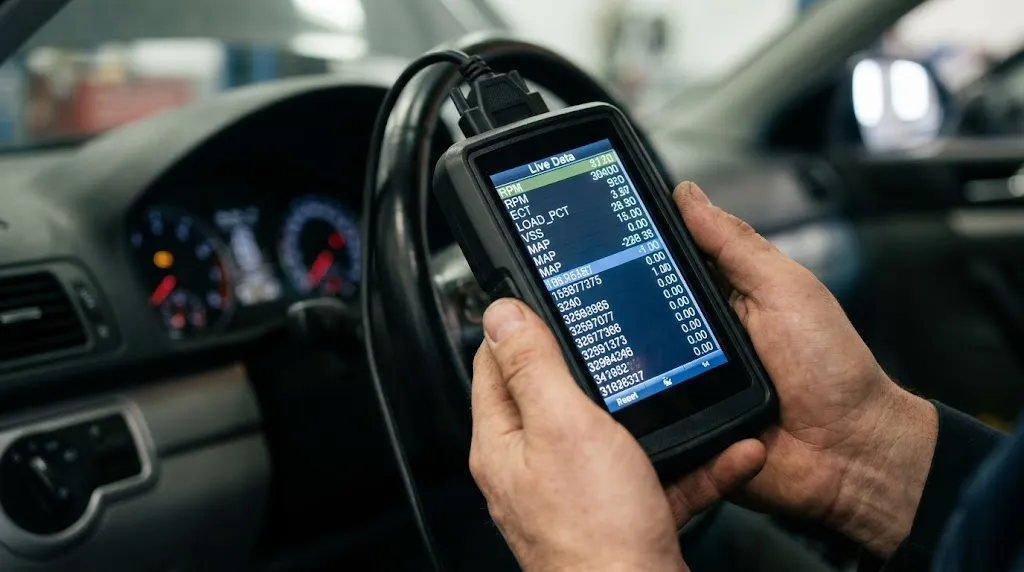
Certain diagnostic procedures cannot be performed unless the engine is actively running. When the engine is off and the ignition is merely switched on, the vehicle’s computer systems are powered up, but many components remain inactive because fuel is not burning and parts are not moving.
To view real-time metrics, the engine must be running so that sensors can generate live operational data. Common scenarios that require a running engine include:
- Reading Live Data Streams: Monitoring oxygen sensor voltages, coolant temperatures, mass airflow sensor rates, and manifold absolute pressure in real time.
- Checking Fuel Trim Adjustments: Observing short-term and long-term fuel trims to identify vacuum leaks or delivery issues under actual load conditions.
- Isolating Intermittent Misfires: Watching cylinder contribution and misfire counters while the engine idles or revs.
- Testing Alternator Output: Checking charging system voltage directly through the diagnostic port while accessories are powered.
Without the engine running, your scanner will typically only display static parameters, stored diagnostic trouble codes (DTCs), and readiness monitor statuses.
Is It Safe for Your Vehicle and Scanner?
A frequent worry is whether plugging in a live electronic tool while electrical currents are active could fry the vehicle’s computer or damage the scanner itself. Fortunately, the OBD2 port and modern diagnostic tools are specifically engineered to handle this scenario safely.
The OBD2 port includes a dedicated power pin that supplies standard battery voltage, along with protected communication lines designed to isolate data traffic. Plugging the device in while the engine is running does not create a dangerous voltage spike under normal operating conditions. Handheld code readers and advanced scan tools alike are built to handshake safely with the vehicle’s computer network regardless of whether the engine is idling or switched off.
Tip
Plug the scanner securely into the under-dash port before starting the vehicle or immediately after starting. Avoid loose connections, which can interrupt data communication streams and force your scanner to reset.
When the Engine Should Stay OFF
While running the engine is necessary for live data, there are several diagnostic tasks where you should keep the engine turned off and the ignition set to the auxiliary position (Key On, Engine Off – KOEO).
Keeping the engine off is recommended when:
- Clearing Diagnostic Trouble Codes: Most vehicle computers require the ignition to be on but the engine off to properly clear stored error codes and reset emission monitors.
- Reading Stored History Codes: Reviewing historical fault codes that do not require active sensor verification.
- Performing Initial System Handshakes: Allowing the scanner to auto-detect the vehicle’s specific protocol, VIN, and module configuration without background electrical noise.
Attempting to clear codes while driving or while the engine is under heavy load can sometimes prevent the computer from successfully executing the reset command.
Common Misconceptions About OBD2 Scanning
A variety of myths surround how automotive diagnostic tools interact with electronic control units. Clearing up these misunderstandings ensures you use your tool effectively without unnecessary caution.
One widespread myth is that plugging in a scanner while driving can reprogram the computer or accidentally alter engine tuning parameters. Basic code readers and standard live-data scanners are read-only devices. They listen to the data bus and request specific parameter IDs, but they cannot rewrite calibration tables or change operational software unless you are using specialized, dedicated ECU flashing hardware.
Another misconception is that leaving a Bluetooth OBD2 adapter plugged in continuously will drain the car battery overnight. While some cheap, unbranded adapters lack proper sleep modes and can draw a small parasitic load, quality diagnostic dongles automatically enter low-power standby modes when the ignition is turned off.
Warning
Never let a dangling scan tool or loose cable interfere with your foot pedals while driving. If you are monitoring live data during a test drive, secure the device safely on the passenger seat or mount it securely.
Best Practices for Safe Vehicle Diagnostics

To get the most accurate diagnostic results while protecting your vehicle’s electrical components, follow a structured sequence when connecting your tool.
Start by locating your vehicle’s OBD2 port, which is usually positioned beneath the driver-side dashboard near the steering column. Ensure the area is clean and free of moisture before inserting the connector. If you only need to read basic stored codes, turn the ignition key to the accessory position without starting the motor. If you need to evaluate sensor behavior or track down an elusive running issue, start the engine first, let it settle into a normal idle, and then plug in your scanner or launch your diagnostic app.
Always review the manufacturer manual for your specific scan tool, as advanced bidirectional scanners may have specific guidelines regarding when active tests can be initiated.
Related Product
OBD2 Diagnostic Scan Tool
A reliable code reader with live data streaming capabilities helps you monitor engine sensors and troubleshoot performance issues accurately.
As an Amazon Associate, we earn from qualifying purchases.
Frequently Asked Questions
Can plugging in an OBD2 scanner blow a fuse?
Under normal conditions, plugging in a standard OBD2 scanner will not blow a fuse. The diagnostic port shares power with your vehicle’s cigarette lighter or accessory circuit, which is fused to handle electrical loads. A fuse will only blow if there is a short circuit inside the scanner cable or if the port itself has been damaged.
Will connecting a scanner while driving clear my codes automatically?
No, connecting a scanner while driving will not clear codes. Diagnostic trouble codes remain stored in the computer’s memory until you explicitly command the tool to erase them or until the vehicle completes a specified number of successful warm-up cycles without the fault recurring.
Can I drive with an OBD2 scanner plugged in?
Yes, many technicians and vehicle owners drive with a scanner or data logger connected to monitor live parameters during actual road conditions. Ensure the device and cables are securely fastened away from the steering wheel and foot pedals to maintain safe vehicle operation.
Why is my scanner failing to link with the engine running?
If your scanner loses connection when the engine starts, it is usually caused by voltage drop during cranking, a loose port connection, or communication interference from aftermarket electronics like remote starters or cheap Bluetooth adapters. Turn off the vehicle, reseat the connector firmly, and try again.
Does an OBD2 scanner record data while the engine runs?
Basic code readers only display real-time numbers on the screen. However, many advanced handheld scanners and smartphone-linked diagnostic apps feature data-recording or snapshot functions that allow you to save live engine parameters for later review.
Are wireless OBD2 adapters safe to leave plugged in?
High-quality Bluetooth and Wi-Fi adapters from reputable brands are safe to leave plugged in for short periods. However, if your vehicle will remain parked for several days, it is best to unplug the adapter to eliminate any potential parasitic battery drain.
Conclusion
Using an OBD2 scanner with the engine running is completely safe and often necessary when you need to inspect live sensor feeds, fuel trim behavior, or intermittent performance issues. While basic code clearing and historical troubleshooting are best performed with the engine off, keeping the motor running unlocks the real-time diagnostic capability required to diagnose modern vehicles accurately. By understanding when to use each approach, you can diagnose automotive issues efficiently and safely.

I’m Alex Rahman, a car enthusiast and automotive writer focused on practical solutions, car tools, and real-world driving advice. I share simple and honest content to help everyday drivers make better decisions.
