Miofive S1 E 4K Dash Cam Review: Is the 2160P Clarity Worth It?
An automotive dashboard camera is no longer just a passive recording device; it is a critical piece of modern vehicle documentation. The Miofive S1 E 4K Dash Cam Front provides continuous high-resolution recording designed specifically to capture license plates, road signs, and vital incident details with high clarity.
By combining a true 2160P UHD image sensor with built-in GPS and Wi-Fi, this standalone front-facing unit aims to deliver premium evidence-gathering without an overly complicated interface. This review evaluates the Miofive S1 E based on its verified specifications, optical hardware, and real-world usability factors to determine if it is the right investment for your daily commute.
Quick Verdict
Reviewed Product
Miofive S1 E 4K Dash Cam
A dedicated front-facing 4K dashboard camera prioritizing video clarity and integrated GPS logging.
Rating:
★★★★☆
4.0/5
Research-based editorial assessment using verified product information, buyer-use factors, limitations, and comparison context.
Best For:
Daily commuters and rideshare drivers who need ultra-high-definition front recording and integrated location data.
Key Specs
2160P (4K) UHD Resolution • 3-Inch IPS Display • Built-in Wi-Fi & GPS • WDR Night Vision
Key Advantage
True 4K sensor captures essential details like license plates at greater distances.
Main Trade-off
24-hour parking mode requires a separately purchased hardwire kit.
Bottom Line
The S1 E offers excellent front-facing documentation for buyers who prioritize video resolution over multi-channel recording setups.
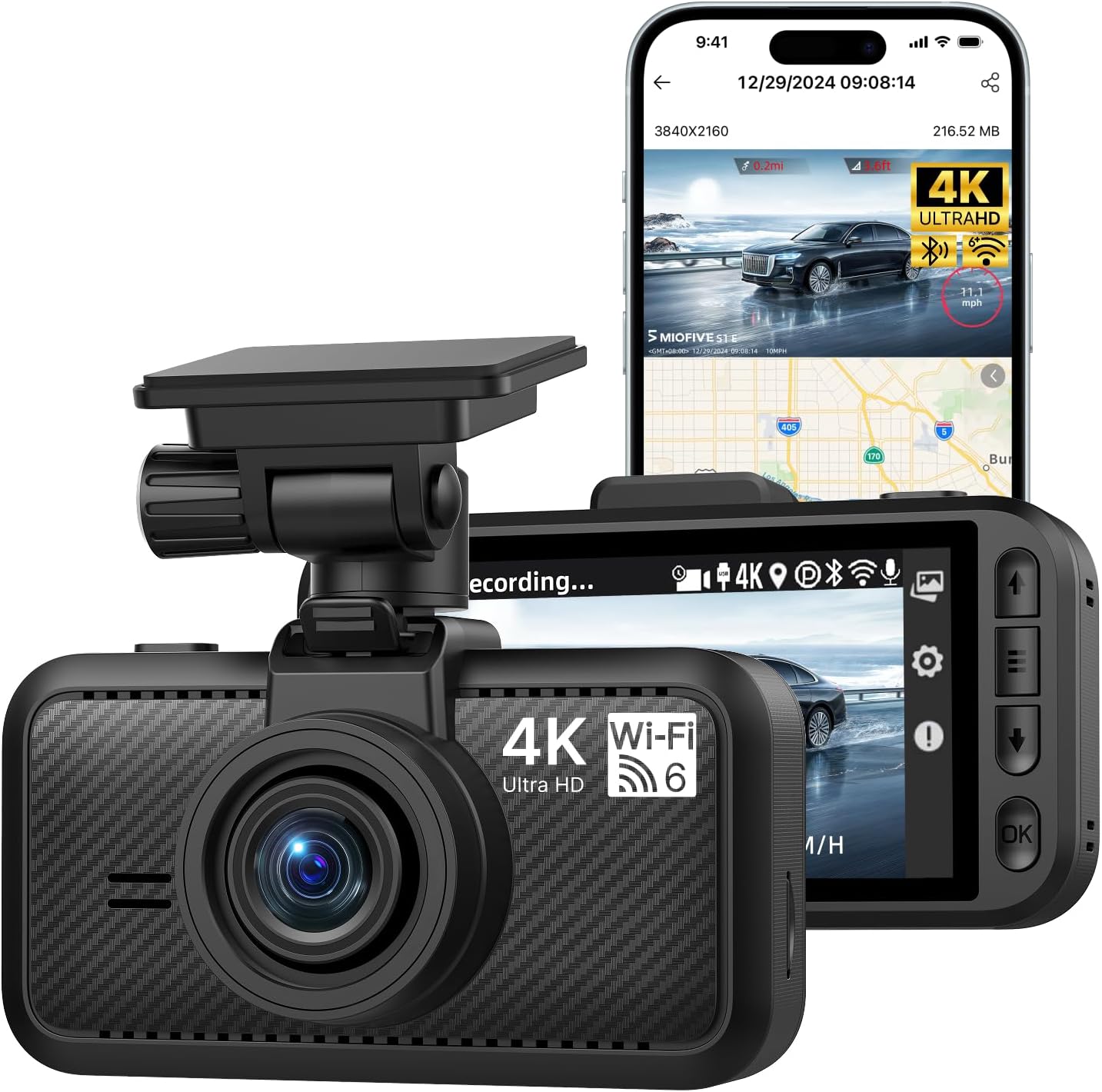
At a Glance
- Records in 3840 x 2160 (4K UHD) for maximum visual clarity.
- Features a 3-inch IPS screen for instant video playback and menu navigation.
- Integrates GPS to automatically log vehicle speed and route history.
- Uses Wide Dynamic Range (WDR) to balance dark roads and bright headlights.
- Supports automated 24-hour parking surveillance when properly hardwired.
Verified Specifications & Buyer Implications
| Attribute | Verified Detail | Why It Matters |
|---|---|---|
| Video Resolution | 2160P (4K UHD) | Higher pixel density allows you to zoom in on paused video to read distant license plates and road signs. |
| Display Type | 3.0-Inch IPS Screen | Provides immediate on-scene video review for law enforcement or insurance without needing to connect a smartphone. |
| Location Tracking | Built-in GPS | Automatically embeds speed and coordinate data into the video file, creating stronger evidence in fault disputes. |
| Connectivity | Built-in Wi-Fi & Smart App | Allows buyers to quickly download incident footage directly to their phone without removing the memory card. |
| Incident Detection | Emergency G-Sensor | Detects sudden impacts or hard braking and permanently locks the current video file so it cannot be overwritten. |
Design & Build Quality
The Miofive S1 E utilizes a standard rectangular chassis designed to accommodate its generously sized 3-inch IPS display. While it is slightly larger than screenless “stealth” cameras, the physical footprint remains manageable when mounted directly behind the rearview mirror.
The housing is constructed from matte black plastics that reduce windshield glare and resist showing fingerprints. The physical buttons are positioned intuitively alongside the screen, offering tactile feedback that makes adjusting settings straightforward even if you prefer not to use the smartphone app.
Setup & Ease of Use
Getting the camera operational requires minimal technical expertise for standard driving mode. The process involves physical mounting and routing the power cable.
- Clean the windshield glass and apply the electrostatic sticker before attaching the adhesive mount.
- Route the included power cable along the vehicle’s headliner and A-pillar trim to hide the wire.
- Plug the adapter into the vehicle’s standard 12V auxiliary power outlet (cigarette lighter).
- Insert a high-endurance MicroSD card (sold separately) and format it using the on-screen prompt.
- Download the companion app to synchronize the time and customize recording preferences.
How This Review Was Researched
This review evaluates the product using verified specifications, manufacturer documentation, current product information, and relevant comparison context within the automotive electronics market. No personal hands-on testing is claimed.
Category-Specific Performance
Video Clarity & License Plate Capture
The primary advantage of a 4K UHD sensor is its ability to resolve fine details that lower-resolution cameras blur into illegible blocks. For a dash cam, this directly translates into a higher probability of capturing a moving license plate.
Because 4K offers four times the pixel density of standard 1080p, buyers have significantly more leeway to digitally zoom in on paused footage. However, fast-moving vehicles passing in opposite directions may still experience slight motion blur depending on relative speed.
Low-Light & Night Vision
Driving at night introduces severe lighting contrast, from pitch-black roads to blinding oncoming headlights. The S1 E utilizes Wide Dynamic Range (WDR) technology to balance these extremes automatically.
By continuously adjusting exposure, WDR prevents license plates from becoming blown-out white rectangles when hit by your headlights. While night footage naturally contains more digital noise than daytime video, the verified WDR processing ensures that critical events remain visible and usable for insurance claims.
Incident Detection & Storage Management
A dash cam is only useful if it preserves the right footage. The integrated G-Sensor monitors physical forces acting on the vehicle.
If the sensor detects an abnormal jolt—such as a collision or severe pothole strike—it instantly flags that specific video segment. This flagged file is segregated from the standard loop recording cycle, meaning the camera will not overwrite your crash footage when the memory card gets full.
Key Features Explained
Built-In GPS Tracking
Unlike some budget cameras that require an external GPS module, the S1 E integrates the antenna directly into the mount or chassis. This feature synchronizes with the video to stamp your exact coordinates and travel speed directly onto the footage.
For the buyer, this provides indisputable proof of vehicle behavior leading up to an incident. If another driver claims you were speeding, the GPS data provides objective documentation to defend against false accusations.
Smart App Control & Wi-Fi
The camera generates its own local Wi-Fi network, allowing your smartphone to connect directly to the device. Using the dedicated app, users can view a live feed, adjust settings, and download saved video files.
This eliminates the frustrating process of removing the MicroSD card, taking it inside, and finding a computer with an SD card reader. The wireless transfer is particularly valuable when you need to share video with a police officer immediately at the scene of an accident.
24-Hour Parking Monitor
When the vehicle is turned off, the camera can transition into a low-power surveillance mode to guard against hit-and-runs or vandalism. It utilizes the G-sensor to wake up and record if the car is struck while parked.
The critical limitation here is power delivery. To use this feature, the buyer must purchase a separate hardwire kit to connect the camera directly to the vehicle’s fuse box, as the standard 12V outlet powers down when the ignition is off.
Real-World Usability & Maintenance
Maintaining a dash cam requires slight, ongoing attention to ensure reliability. Because the S1 E records in 4K, it writes massive amounts of data to the MicroSD card continuously.
This constant read/write cycle degrades memory cards over time. Buyers must purchase a “High Endurance” MicroSD card designed specifically for continuous surveillance; standard consumer cards will fail rapidly. Additionally, formatting the card through the camera menu once a month is highly recommended to clear fragmented files and maintain optimal recording performance.
Pros & Cons
Pros
- True 4K video resolution
- Integrated GPS speed logging
- Large 3-inch IPS display
- Wireless app connectivity
Cons
- Requires separate hardwire kit for parking mode
- No rear camera channel included
- 4K files consume storage rapidly
Common Issues & Fixes
Memory Card Error Messages
Cause:
Using a standard SD card or allowing the card to become heavily fragmented from loop recording.
Fix:
Upgrade to a High Endurance V30 MicroSD card and format it in the camera menu every 30 days.
Smartphone App Won’t Connect
Cause:
The smartphone detects that the camera’s Wi-Fi has no internet and automatically switches back to cellular data.
Fix:
Temporarily disable cellular data or turn off “Wi-Fi Assist” in your phone settings while downloading videos.
Parking Mode Kills Vehicle Battery
Cause:
The aftermarket hardwire kit is set to an unsafe voltage cutoff limit.
Fix:
Ensure your hardwire kit’s physical switch is set to shut off power at 12.0V or 12.2V to preserve starting power.
What to Know Before You Buy
Buyers must factor in hidden costs before purchasing the S1 E. A high-quality dash cam is useless without high-quality storage, meaning you must budget for a recognized High Endurance MicroSD card. Standard cards will void warranties and fail when you need them most.
Furthermore, if you intend to use the 24-hour parking monitor, you cannot use the included cigarette lighter plug. You will need to order a compatible hardwire kit and feel comfortable tapping into your vehicle’s fuse box, or pay a professional installer to route the power properly.
Who Should Consider It / Who Should Look Elsewhere
Who Should Consider It
- Drivers requiring highest possible video clarity
- Those who want immediate on-screen playback
- Users needing integrated speed and GPS data
Who Should Look Elsewhere
- Drivers who need front and rear recording
- Buyers seeking an ultra-tiny stealth camera
- Those unwilling to buy high-endurance memory cards
Alternatives to Consider
Reviewed Product
Miofive S1 E 4K
Best For: High-resolution evidence seekers
Key Specs: 4K UHD, GPS, 3″ IPS Screen
Advantage: Maximum license plate legibility
Trade-off: Single front channel only
Alternative A
VIOFO A119 V3
Best For: Value-focused commuters
Key Specs: 1440p 2K, GPS, 2″ Screen
Advantage: Proven long-term reliability
Trade-off: Lacks Wi-Fi app connectivity
Alternative B
Garmin Dash Cam Mini 2
Best For: Stealth installation setups
Key Specs: 1080p, Wi-Fi, Voice Control
Advantage: Ultra-compact invisible footprint
Trade-off: Lower 1080p video resolution
Is It Worth It?
For drivers who only need front-facing protection, the Miofive S1 E represents a strong value proposition. Upgrading from a standard 1080p camera to true 4K UHD dramatically increases the likelihood of capturing a fleeting license plate in a hit-and-run scenario.
The inclusion of an IPS screen and integrated GPS ensures the device remains user-friendly and data-rich. However, if you live in a city with high rear-end collision rates, spending slightly more for a dual-channel (front and rear) system may provide a better overall return on investment.
Final Verdict
The Miofive S1 E succeeds in its core mission: delivering exceptionally clear forward-facing video evidence. Its combination of WDR night vision, built-in GPS, and seamless Wi-Fi app connectivity makes it a highly capable daily witness.
Buyers should select this camera if they want premium front-facing resolution without the hassle of routing wires to a rear camera. If you require full 360-degree coverage or built-in parking power, you will need to explore more complex multi-camera setups.
Frequently Asked Questions
Does the camera come with a hardwire kit?
No, the hardwire kit is sold separately. The package includes a standard 12V auxiliary power cable for basic driving mode recording.
Can I add a rear camera to this unit later?
No, this is a single-channel system. The S1 E is strictly a front-facing camera and does not have an input port for a secondary rear lens.
Do I need an app to use the camera?
No, the camera functions independently. Because it features a built-in 3-inch screen, you can adjust all settings and view recorded footage directly on the device.
Will 4K recording fill up my memory card instantly?
Yes, 4K files are large, but loop recording manages the space. Once the card is full, the camera automatically deletes the oldest unprotected video to make room for new footage.
Does it record audio inside the cabin?
Yes, it features a built-in microphone. Audio recording can easily be muted in the settings if you prefer privacy during your commute.
Affiliate disclosure: Leadfoot Automotive earns a small commission when you purchase through links on this page — at no extra cost to you. Our editorial process is independent: affiliate relationships never influence which products we recommend or how we rank them.

I’m Alex Rahman, a car enthusiast and automotive writer focused on practical solutions, car tools, and real-world driving advice. I share simple and honest content to help everyday drivers make better decisions.
