
Can I Use My iPhone as a Dash Cam and Is It Worth It?
Yes, you can use your iPhone as a dash cam. Install a dash cam app, mount your phone securely, and keep it powered while driving. It works well for short trips, but long-term use has limits like heat, storage, and battery strain.
I once forgot my dash cam before a long highway drive. I grabbed my iPhone, mounted it, and hit record. It worked. But it also showed me the limits fast.
I’m Alex Rahman, and I test practical tech for everyday use. Many drivers ask if they can use their iPhone as a dash cam. The short answer is yes, but the real answer depends on how you drive and what you expect.
Let’s break it down so you can decide with confidence.
- Your iPhone can record driving video with the right app.
- You need a mount and constant power for safe use.
- Heat and storage limits make it less reliable long-term.
- A real dash cam still performs better for daily driving.
What Does It Mean to Use an iPhone as a Dash Cam?
Using your iPhone as a dash cam means you turn your phone into a driving recorder that captures video while you drive using its camera and a dedicated app.
Your iPhone already has a powerful camera and GPS. Dash cam apps add features like loop recording and crash detection. Together, they mimic a traditional dash cam setup.
Rule: The phone replaces the camera, but not the system.
You still need mounting, power, and storage to make it work properly.
Next, let’s see how reliable it is in real driving.
Can an iPhone Really Work as a Dash Cam in Daily Driving?
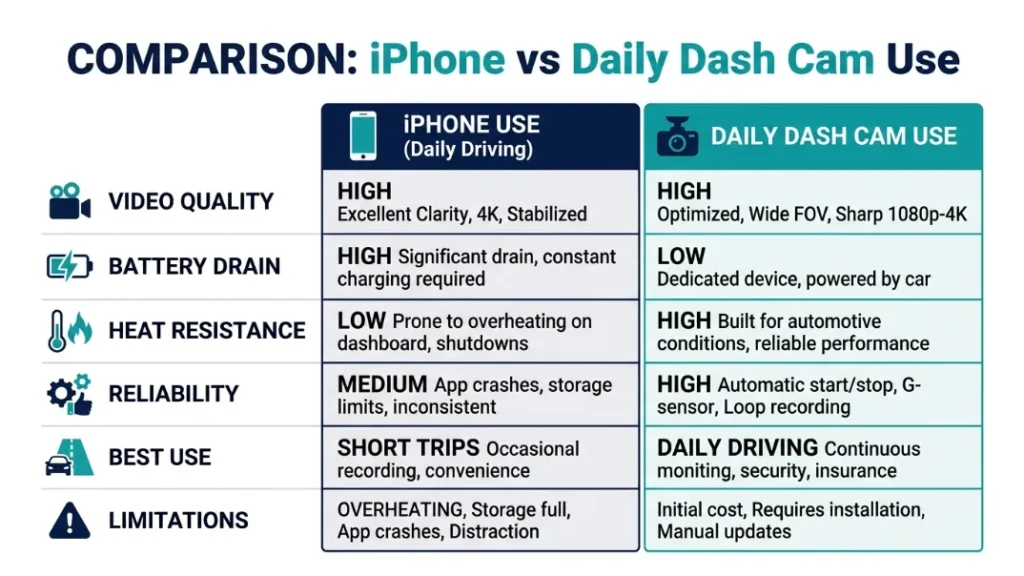
Yes, an iPhone can work as a dash cam for daily driving, but it performs best for short trips and occasional use rather than all-day recording.
Modern iPhones shoot sharp video in 1080p or 4K. That gives clear footage in daylight. Apps also auto-save clips during sudden stops.
Rule: Short sessions work well, long sessions expose limits.
Battery drains fast, and heat builds up during long recording sessions.
So you must prepare the right setup before relying on it.
What Do You Need to Turn Your iPhone Into a Dash Cam?
You need three core things to turn your iPhone into a dash cam: a stable mount, a constant power source, and enough storage space for continuous video recording.
Without these, your setup fails quickly. The phone may fall, shut down, or stop recording.
Rule: Stability, power, and storage define success.
Let’s break each one down.
Which Mount Keeps Your iPhone Stable While Driving?
A windshield or dashboard mount with strong grip keeps your iPhone stable and ensures clear, shake-free video while driving.
Look for suction mounts or clamp holders. Cheap mounts shake and ruin footage.
Place the mount behind your rearview mirror to avoid blocking your view.
Why Power Supply Matters for Continuous Recording
Continuous recording drains your iPhone battery fast, so a car charger keeps it powered during your entire drive.
Video recording uses heavy processing and screen time. Battery alone lasts one to two hours.
Rule: Always plug in during recording.
How Much Storage Do You Actually Need?
Dash cam recording uses large storage, with one hour of 1080p video taking around 6 to 10 GB depending on settings.
Without loop recording, storage fills fast. Apps help overwrite old clips automatically.
Fix: Use apps with loop recording and keep at least 20GB free.
Now let’s set everything up step by step.
How Do You Set Up Your iPhone as a Dash Cam Step by Step?
You can set up your iPhone as a dash cam by installing a dash cam app, mounting your phone securely, connecting power, and adjusting camera settings for road recording.
- Download a dash cam app from the App Store.
- Mount your iPhone on the windshield or dashboard.
- Connect a car charger for continuous power.
- Set video resolution to 1080p for balance.
- Enable loop recording inside the app.
- Start recording before you begin driving.
Rule: Always start recording before moving the car.
This simple setup gives you basic dash cam functionality.
Which Are the Best Dash Cam Apps for iPhone in 2026?
The best dash cam apps for iPhone offer loop recording, GPS tracking, and automatic incident detection to mimic real dash cam features.
Popular options include Nexar, AutoBoy Dash Cam, and Driver. These apps add key features missing from basic video recording.
- Nexar: Cloud backup and smart alerts
- AutoBoy: Offline recording and loop support
- Driver: Clean interface and GPS tracking
Rule: Choose apps with auto-save and loop recording.
For more details, check Apple App Store listings.
Now let’s weigh the benefits.
What Are the Pros of Using an iPhone as a Dash Cam?
Using an iPhone as a dash cam gives you a low-cost, flexible solution with high-quality video and easy setup using a device you already own.
- No extra device cost
- High camera quality
- Easy to install and remove
- App-based features like GPS and alerts
Insight: It works best as a temporary or backup solution.
An iPhone dash cam setup saves money and offers strong video quality. It works well for occasional use but lacks long-term durability.
But there are real downsides you must know.
What Are the Downsides and Risks You Must Know?
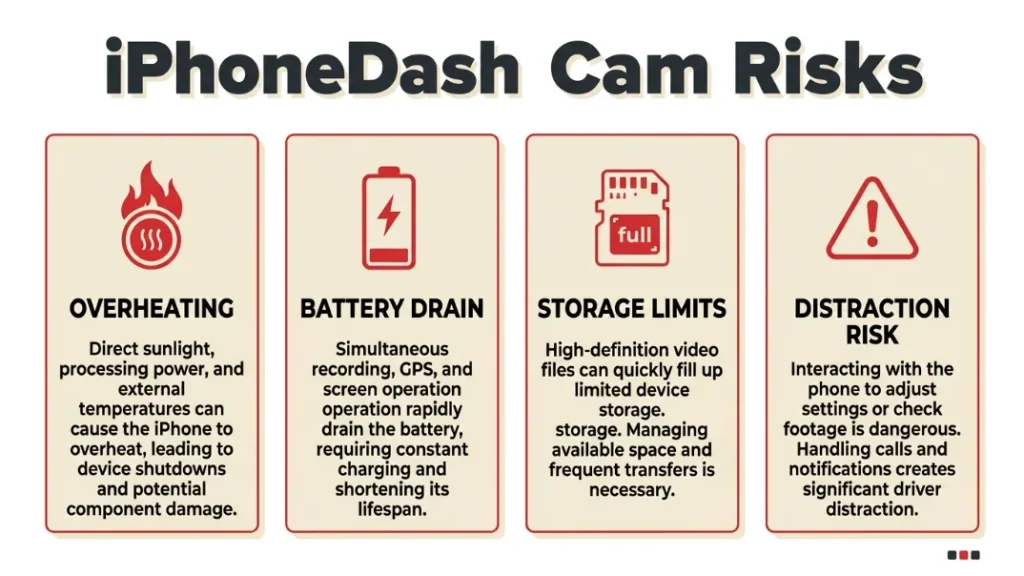
The biggest downsides include overheating, battery strain, storage limits, and distraction risks while driving.
Phones are not built for constant high-heat recording. In hot climates, your iPhone may shut down to protect itself.
Direct sunlight can overheat your iPhone within minutes while recording.
- Battery health drops over time
- Calls and notifications interrupt recording
- Storage fills quickly without management
See Apple’s official guidance on iPhone operating temperatures.
Next, let’s check legal concerns.
Is It Legal to Use Your iPhone as a Dash Cam?
Yes, using your iPhone as a dash cam is legal in most regions, but you must follow local laws about recording, privacy, and windshield obstruction.
Some countries restrict audio recording without consent. Others limit where you place devices on the windshield.
Rule: Always check local traffic and privacy laws.
For general guidance, review dash cam regulations overview.
Now compare it with real dash cams.
How Does an iPhone Compare to a Real Dash Cam?
An iPhone offers flexibility and strong video quality, while a dedicated dash cam provides reliability, durability, and hands-free operation designed for continuous driving use.
| Feature | iPhone | Dash Cam |
|---|---|---|
| Video Quality | High | High |
| Battery Use | High drain | Low impact |
| Heat Resistance | Low | High |
| Ease of Use | Moderate | Very easy |
| Cost | Free (if owned) | Extra purchase |
Insight: Dash cams win for daily reliability.
Let’s decide when to use each option.
When Should You Use an iPhone Instead of Buying a Dash Cam?
You should use your iPhone as a dash cam when you need a quick, temporary solution or want to test dash cam usage before buying a dedicated device.
- Short trips or occasional driving
- Emergency backup recording
- Testing dash cam features before buying
If you drive daily, your iPhone works as a trial—not a long-term solution.
Now let’s see when to avoid it.
When Should You Avoid Using Your iPhone as a Dash Cam?
You should avoid using your iPhone as a dash cam for long daily commutes, extreme heat conditions, or professional driving where reliable recording is critical.
- Ride-sharing or delivery driving
- Hot weather regions with strong sunlight
- Long highway trips
Rule: If reliability matters, use a real dash cam.
Let’s improve your setup with expert tips.
What Are Expert Tips to Get the Best Results?
You can improve your iPhone dash cam setup by optimizing placement, settings, and heat management to ensure better recording quality and reliability.
- Use 1080p instead of 4K to save storage
- Turn on airplane mode to avoid interruptions
- Keep AC on to reduce heat
- Clean the lens before every drive
Use a short charging cable to reduce clutter and distraction.
These small changes make a big difference.
Final Verdict: Should You Use Your iPhone as a Dash Cam?
Yes, you can use your iPhone as a dash cam, but it works best as a temporary or backup solution rather than a full replacement for a dedicated dash cam.
It gives you strong video quality and easy setup. But heat, battery, and storage limits reduce long-term reliability.
I’m Alex Rahman, and I recommend using your iPhone as a starter option. If you drive often, invest in a proper dash cam for peace of mind.
Start simple. Then upgrade when you see the need.
Frequently Asked Questions
Can I use my iPhone as a dash cam without an app?
Yes, you can use the camera app to record video. However, you miss features like loop recording and crash detection.
Does using an iPhone as a dash cam damage the battery?
Long recording sessions increase battery wear over time. Heat and constant charging also reduce battery lifespan.
Will my iPhone overheat while recording in the car?
Yes, heat builds up quickly, especially in sunlight. This may cause the phone to stop recording.
How long can an iPhone record video continuously?
It depends on storage and power. With enough space and charging, it can record for hours.
Is a dash cam better than using an iPhone?
Yes, a dash cam offers better reliability and durability. It is built for continuous recording in cars.
Do I need internet for a dash cam app?
No, most apps work offline. Internet helps with cloud backup and extra features.

I’m Alex Rahman, a car enthusiast and automotive writer focused on practical solutions, car tools, and real-world driving advice. I share simple and honest content to help everyday drivers make better decisions.
